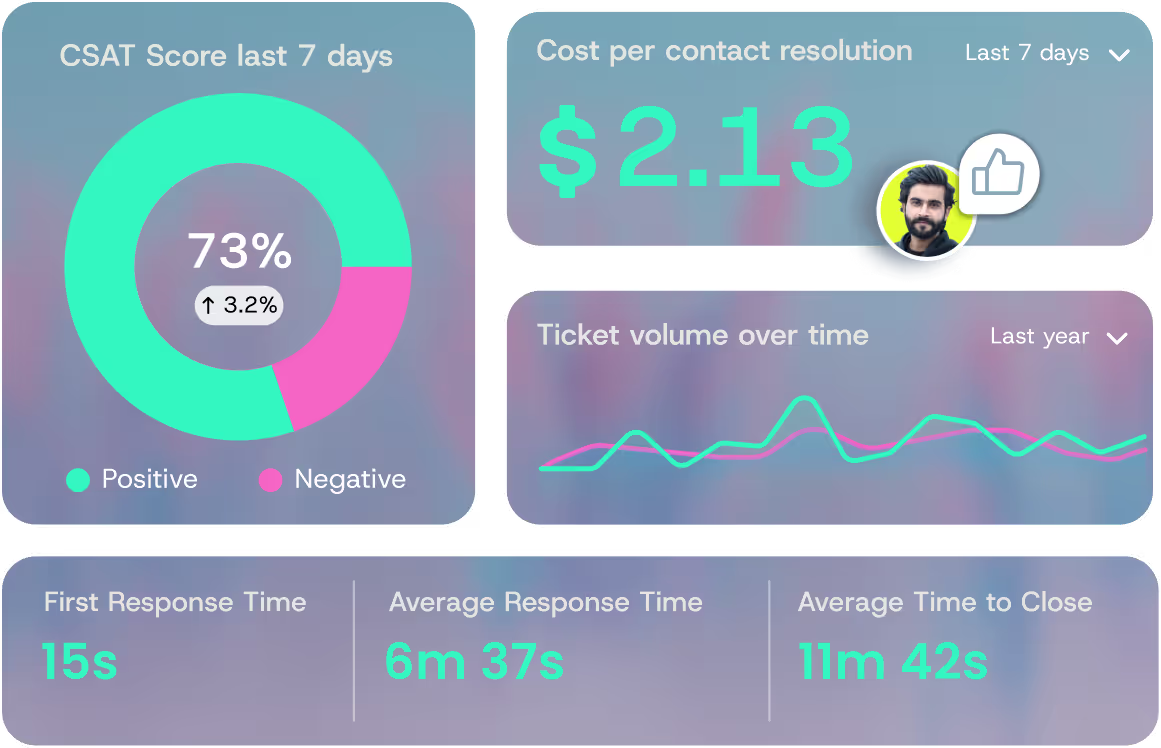
How to Reduce Customer Response Time and Boost Satisfaction
Slow replies cost you customers. Most consumers expect a response within hours, and a meaningful chunk expect it within minutes, according to Sprout Social's annual Index data.
Knowing how to improve response time to customer messages is no longer optional, because the next click usually lands on a competitor's homepage.
The goal is fast and accurate together. A 30-second reply that punts to a human or hands back a generic FAQ link does nothing for your CSAT score.
This guide walks through nine concrete plays support leaders can ship this quarter, plus the metrics, benchmarks, and AI architecture decisions behind them.
Why Customer Response Time Decides Whether Customers Stay or Leave
Speed is not a vanity metric. It correlates with retention, churn, ticket backlog, and how often your team gets dragged into preventable escalations.
Most consumers now expect their issue resolved within a few hours of first contact, and the gap between that expectation and what your team delivers is where dissatisfaction lives.
The compounding cost is what gets missed. A slow first response pushes the customer to a second channel. That second touch creates a new ticket, often with frustrated language attached.
Agents now handle the original problem plus a venting cycle, which doubles the resolution time on a ticket that should have been a single message. Multiply that across a quarter and you have a backlog you cannot staff your way out of.
The other half is brand perception. Customers read response speed as a direct signal of how much a company respects their time, and that read is rarely subtle. It shapes whether the next renewal happens.
This guide treats response time as a satisfaction lever rather than a deflection metric. Speed without resolution is just theater.
What Counts as "Response Time" (and the Metric Most Teams Get Wrong)
Three definitions matter here, and most support orgs conflate them.
First response time (FRT) measures the elapsed time between a customer's first message and the first reply from your team. It can be human or automated, useful or generic.
Average response time (ART) measures the mean elapsed time between every customer message and the agent reply that follows it. This captures the back-and-forth, not just the opening exchange.
Resolution time measures the elapsed time between the customer's first message and the moment their issue is closed. This is the metric the customer cares about.
The trap most teams fall into is optimizing FRT in isolation. A bot that fires "Thanks, we got your message" inside two seconds wins the FRT scorecard but does nothing to solve the problem.
The customer waits the same number of hours for the real answer, but now they wait through a layer of acknowledgment they did not ask for.
A better framing is time to first meaningful response, or how long until the customer gets something they can use. An answer. A document. A status.
A next step. Track FRT for SLA compliance, but track time to first meaningful response for satisfaction.
A quick example. Say your team logged 100 tickets last week with these first reply gaps:
- 30 tickets at 5 minutes (auto-acknowledgments)
- 50 tickets at 4 hours (real agent reply)
- 20 tickets at 12 hours (overnight backlog)
The FRT mean looks fine at roughly 4.4 hours. The median, calculated within business hours only, tells a different story. Half your customers waited at least 4 hours for any useful response.
Always report median rather than mean, and always cap the calculation at business hours when you don't run 24/7 support.
Industry Benchmarks for Customer Response Time in 2026
Benchmarks shift by channel because customer expectations shift by channel. Live chat carries the tightest window because the customer is sitting on the page waiting.
Email is more forgiving, but the bar has tightened every year. Social DMs land in between. Phone is its own animal, governed by hold-time tolerance rather than reply time. Chat carries no hold time at all, which is one of the sharpest contrasts in chat vs. voice customer service, because one agent or one AI can hold several conversations open at once.
The current rough benchmarks across consumer-facing industries:
- Live chat: under 2 minutes
- Social DM: under 1 hour
- Email: under 4 hours during business hours
- Phone: under 60 seconds of hold time
Regulated industries operate on tighter floors. Financial services teams handling account access, healthcare teams handling clinical questions, and technology teams handling outage tickets often face SLA windows dictated by contract or compliance, not by customer preference.
A SaaS contract with a Fortune 500 customer might guarantee a 15-minute response on Sev-1 tickets with credits attached to misses.
Treat these numbers as floors rather than goals. Hitting the industry average just buys you a seat at the table. Beating it consistently across channels is where retention and expansion live.
9 Proven Ways to Improve Response Time to Customer Requests
The plays below are sequenced from quickest to ship to highest impact. Most teams can implement the first three inside a sprint.
The middle plays require workflow and tooling decisions. The last few require organizational commitment. Start at the top, plan for the bottom.
Set Channel-Specific SLAs and Hold the Team to Them
A single SLA across every channel is the most common mistake in support operations. Chat and email cannot share the same target. A 4-hour chat reply is a dead conversation.
A 2-minute email reply is unnecessary overhead. Each channel needs its own SLA matched to the customer's expectation on that channel.
A workable starting matrix is chat under 2 minutes, social under 1 hour, email under 4 hours, and phone under 60 seconds of hold. Set tighter SLAs for VIP segments or regulated tickets, and looser SLAs for after-hours overflow if that is your actual coverage.
An SLA without enforcement is a goal, not a system. Pair every SLA with real-time alerts that fire to the on-shift lead when a ticket is 75% of the way through its window.
Tie SLA performance to weekly team scorecards and to the on-call rotation. The teams that hit SLAs consistently are the teams that watch them in real time, not at end-of-month review.
Auto-Route Tickets by Intent, Not Just Category
Keyword-based routing breaks the moment a customer phrases their issue in a way your rules did not anticipate.
A ticket tagged "billing" might be a simple invoice question or a billing dispute that needs to go to a senior agent and a compliance officer.
Rules cannot tell the difference. Intent-based routing can.
The difference is semantic understanding versus pattern matching. Intent-based routing reads the actual message, parses what the customer needs, and routes accordingly.
"I need to change my plan" goes to retention. "Charge looks wrong" goes to billing. "I never received the upgrade I paid for" goes to escalations, not the general billing queue.
QueryPal's intent detection runs against your past ticket history and your documentation.
The model sees thousands of variations of a "billing dispute" alongside the resolutions they required, and routes new tickets to the same outcome path on the first touch.
That removes the triage cycle that adds 20 to 40 minutes to every misrouted ticket.
Build a Knowledge Base Your AI Can Use
Most knowledge bases were built for humans browsing during a support call. They are fragmented across wikis, help centers, internal Slack channels, and a folder of PDFs no one has touched in two years.
That structure is fine for a senior agent who knows where to look. It breaks every AI tool you deploy on top of it.
Three structural fixes have the highest leverage:
- Establish a single source of truth per topic so the model retrieves one canonical answer rather than three conflicting answers.
- Tag articles by intent, product, and version so retrieval can filter to the right context.
- Maintain version control with a clear deprecation process so stale articles do not surface in responses.
A clean knowledge base is the single highest-leverage investment a support org can make before deploying any AI.
Bolted onto a messy KB, the same model will hallucinate, contradict itself, and route customers to broken links. Once the underlying data is clean, that same model starts resolving tickets that used to require a human.
The work is unglamorous and rarely on a roadmap, but the ROI is immediate.
Use AI to Resolve Tier 1 to Tier 3 Tickets Autonomously
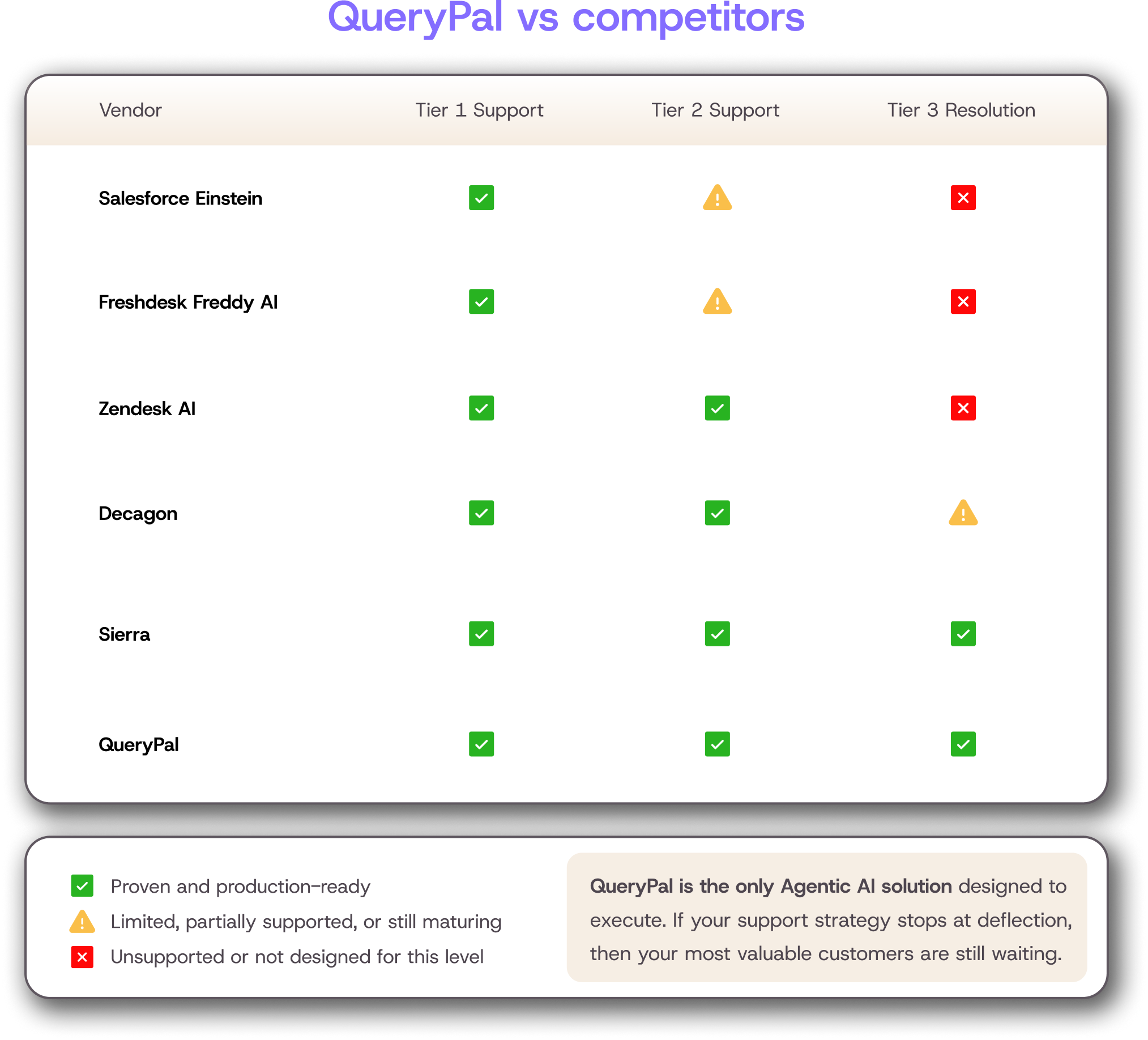
This is where most "AI for support" tools quietly fail. Deflection and resolution measure different things. A deflected ticket is closed, often because the customer gave up or got bounced to a self-serve dead end.
A resolved ticket means the customer's problem got fixed. A deflection-focused tool can post a great-looking metric while your CSAT quietly slides.
Gartner projects that 80% of common customer service issues will be resolved autonomously by agentic AI by 2029. That projection only holds if the AI you deploy can resolve, not just deflect.
The tickets that survive automation are messy, which means your AI has to handle the middle of the stack instead of just the FAQ.
QueryPal is built for this layer. The platform scans existing documentation, past tickets, and workflows to generate context-aware responses for Tier 1 through Tier 3 issues.
Instead of routing a complex billing dispute to a human queue, the system pulls the customer's contract terms, the relevant policy article, and the past resolution pattern, then drafts a complete answer the customer can act on. The human enters the loop for edge cases, not for every ticket.
Give Agents an AI Copilot for First-Draft Responses
The tickets that survive automation still need to move faster. A copilot drafts the first response so the agent reviews and sends instead of writing from scratch.
The math is straightforward. If your agents spend an average of six minutes drafting a reply and the copilot cuts that to two minutes of review-and-edit, you have recovered two-thirds of the human-touched response time.
A few copilot tasks return the most time:
- Drafting full responses against the knowledge base
- Summarizing long ticket threads before a handoff
- Translating between languages on global accounts
Each one strips out a step that previously required real cognitive load from the agent.
This is the layer QueryPal Intercept handles. The copilot pulls from your help center, past tickets, and internal sources like Slack and Notion to draft the response your agent reviews and sends.
Agents get a starting point that already cites the right policy and the relevant account state, so the work shifts from writing to verifying.
The QA layer matters here. Copilots will hallucinate policy if you let them. Build in mandatory review for any response that touches refunds, account access, or compliance topics, and audit a sample of copilot-drafted responses weekly to catch drift.
The goal is faster correct responses, not faster wrong responses.
Unify Channels Into a Single Agent Workspace
Most support teams run on four or more tools per ticket:
- A help desk for the ticket itself
- A CRM for customer history
- A billing system for account data
- An internal wiki for policies
Every channel switch costs context. The agent spends 30 seconds remembering where they were, what they just asked, and what they need next.
A unified workspace consolidates the inbox, customer history, and macros into one view. The agent sees the full conversation across channels, the customer's account state, and past tickets without leaving the page.
Switching costs drop. First-touch resolution rises.
Tie the workspace to your FRT goals. The teams that hit aggressive FRT targets are almost always running unified tooling. The teams that miss them are usually paying a productivity tax on tool-switching that no headcount plan will fix.
Use Templates and Macros for Repeatable Responses
Macros still own the long tail of support. A team handles hundreds of variations of "where is my order" every week, and the right answer rarely changes. Templates make that response instant.
The framework for which intents to template is simple. Identify the top 20 ticket intents by volume. Of those, select the intents that have a single correct answer regardless of customer context. Template those. Leave personalization to the AI and the human for the rest.
The risk to watch is over-templating.
If a customer is asking a complex question and gets a templated response that ignores half the issue, you have damaged the relationship faster than no response would have. AI-generated drafts are evolving the macro concept, but macros still own the volume-driven base of your queue.
Train Agents on Triage Speed, Not Just Product Knowledge
Most support training teaches the product. That gets agents to the correct answer, eventually. What it does not teach is the decision-making sequence required to get there fast.
A triage rubric works better than a product manual for response time. Train agents to classify the ticket type, prioritize against the SLA, and decide whether to resolve or route, all inside 60 seconds. Score them on triage speed, not just resolution accuracy.
The agents who triage fast hand off cleanly, which means fewer cycles per ticket and less mental load on the next agent in the queue.
Faster triage reduces burnout. The cognitive cost of every ticket is highest in the first 30 seconds, when the agent is parsing what they are looking at. Training that into a habit pulls the cost down, which pulls fatigue down across the day.
Staff for Peak Hours and Monitor Backlog in Real Time
Workforce management basics still apply. Forecast volume by channel by hour using last quarter's data, staff against the forecast, and adjust weekly. The teams that consistently miss SLAs are usually the teams flying blind on coverage.
Pair the forecast with a real-time backlog dashboard. When inbound volume spikes and ticket aging crosses a threshold, the system should trigger swarming by pulling cross-trained agents from low-priority queues into the spike.
That decision needs to happen inside the spike, not at the end of the day when the backlog has already cost you SLAs.
Staffing patches coverage gaps in the short term without changing the underlying ticket volume. Automation goes further by shrinking the volume the team needs to cover at all. Use both, but treat staffing as a buffer rather than a strategy.
How to Measure Whether Your Response Time Improvements Are Working
A single metric will lie to you. FRT can drop and resolution time can still climb.
Deflection rate can rise and CSAT can still fall. The only honest read is a composite weekly view that pulls FRT, ART, resolution time, deflection rate, and CSAT into a single review.
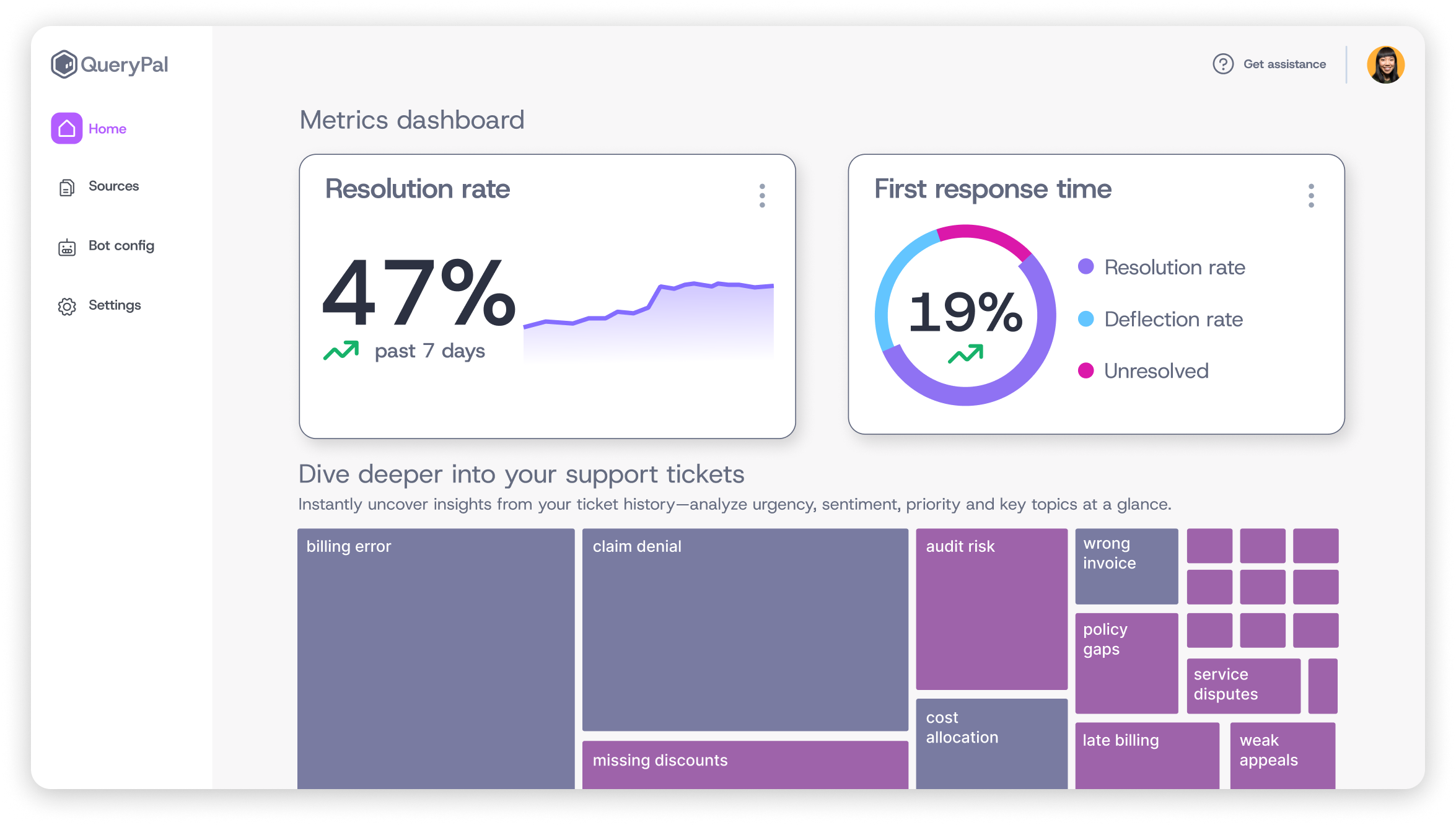
Deflection rate is the metric most likely to mask poor performance. A high deflection number looks like a win until you look at the customers who deflected. If they bounced to a second channel or never returned, you didn't save a ticket so much as hide it.
Pair deflection rate with CSAT and repeat-contact rate to catch this early.
A 30-60-90 review cadence keeps the metrics actionable. At 30 days, review the leading indicators (FRT trend, backlog aging, SLA compliance).
At 60 days, layer in resolution time and CSAT. At 90 days, evaluate the program-level outcomes (cost-per-ticket, agent retention, customer churn). Assign a named owner to each metric so no one can hide behind a team scorecard.
Where Enterprise AI Fits in the Response Time Equation
Most "AI for support" tools fail enterprise security review. They route customer data through third-party LLM APIs, store training data in shared infrastructure, and offer no way to keep PII inside your environment.
For a fintech, a healthcare provider, or a SaaS company handling regulated data, those tools are not deployable.
Enterprise requirements are concrete.
You need SOC 2 Type 2 compliance, GDPR alignment, self-hosted deployment options, and clear data residency.
Zendesk's CX Trends report found that 67% of CX leaders believe AI chatbots are strengthening customer relationships, but that belief only holds when the AI clears the security bar. A breach kills the gains and the contract at the same time.
QueryPal was built for this from day one. The platform is SOC 2 Type 2 compliant, GDPR-compliant, and offers self-hosted deployment for teams that cannot send customer data outside their environment.
The founding team, which holds 30+ AI patents and includes Dev Nag (Wavefront, acquired by VMware; VMware's Project Magna), designed the architecture for regulated industries before agentic AI became a category.
That posture is why technology, financial services, and healthcare teams can deploy autonomous resolution on Tier 1 to Tier 3 tickets without breaking compliance.
Improve Response Time to Customer Requests Without Burning Out Your Team
The teams that win on response time don't run the most spreadsheets. They pair tight process and proven helpdesk best practices with enterprise-grade automation, then measure both speed and resolution honestly.
A reply that arrives instantly but answers nothing damages the relationship just as much as a perfect answer that shows up two days late. The mandate is both, in equal measure.
QueryPal handles the layer that breaks most support orgs, the messy Tier 1 to Tier 3 tickets that need real context instead of a deflection script.
The platform draws on your documentation, past tickets, and internal tools to resolve the issues your customers wrote in about, with SOC 2 Type 2 compliance and self-hosted deployment for teams that cannot send customer data outside their environment.
Technology, financial services, and healthcare teams already run it against their toughest queues, which is why a category built on chatbots has started losing ground to AI that resolves.

Activate your free
6 week trial
& white-glove integration support.
Cut support costs by 60%, slash response & resolution times, improve your customer experiences, & reduce agent burnout. Find some time with us to show you how.