What Is Software Scalability? Its Importance and How to Achieve It
Every system works fine until it doesn't. The app handles 500 concurrent users without a hiccup, then traffic doubles overnight and response times crater. Customers start leaving. Revenue follows.
Software scalability is what separates products that grow from products that collapse under their own success.
This guide breaks down what scalability actually means, why it matters to your bottom line, and the specific strategies engineering teams use to build systems that hold up as demand increases.
What Is Software Scalability?
Software scalability is a system's ability to handle increased workload by adding resources, without requiring a fundamental redesign of the application.
A scalable system maintains acceptable performance levels as users, data volume, or transaction frequency grows.
That definition matters because scalability in software engineering is often confused with raw performance. Performance measures how fast your system responds right now, under current load.
Scalability measures how well it maintains that performance when load increases by 10x or 100x.
Think of it like a restaurant kitchen. A fast kitchen (good performance) can plate meals quickly with the current staff.
A scalable kitchen can add more cooks, more stations, and more equipment to handle a Saturday night rush without the whole operation falling apart.
Speed and scalability are related, but they solve different problems.
Why Software Scalability Matters for Your Business
Scalability isn't an engineering concern that lives in a vacuum. It directly affects revenue, customer retention, and long-term business growth.
When your application slows down under load, users leave. Research from Google found that 53% of mobile users abandon sites that take longer than three seconds to load.
That's half your potential customers gone before they even see what you're offering. And page speed under load is fundamentally a scalability problem.
The financial costs are compounding. According to Fortune Business Insights, the global cloud computing market is projected to grow from $905 billion in 2026 to $2.9 trillion by 2034, reflecting a 15.7% compound annual growth rate.
That growth means more applications, more users, and more data flowing through systems that weren't always designed to handle it. If your architecture can't keep pace, you fall behind competitors who planned ahead.
There's an operational cost most teams underestimate. When systems buckle under load, engineering teams shift into firefighting mode. They're patching bottlenecks at 2 a.m. instead of building new features.
Support teams spend their days apologizing for slowdowns instead of helping customers succeed. Technical debt piles up because every fix is reactive, never proactive.
Investing in customer support automation early helps teams maintain service quality during these growth phases.
Vertical vs. Horizontal Scaling
Two fundamental approaches exist for adding capacity to a system. Each has trade-offs, and most scalable architectures eventually use both.
Vertical scaling (scaling up) means adding more power to your existing machines. More CPU, more RAM, faster storage, bigger disks. You're making each server individually stronger.
The upside is simplicity. Your application code doesn't change. Your deployment stays the same. One bigger machine replaces one smaller machine, and the system runs faster.
The downside is a hard ceiling. There's a physical limit to how powerful a single server can be. And the cost curve gets steep at the top end, where doubling capacity might cost four times the price.
Horizontal scaling (scaling out) means adding more machines to your system instead of making one machine bigger. Your application runs across multiple servers, and the workload gets distributed among them.
This is how large-scale web applications operate. Netflix, Spotify, Google, Amazon... they aren't running on one very expensive computer. They run across thousands of servers, with load balancers directing traffic and orchestration tools managing the fleet.
Horizontal scaling has no theoretical ceiling. Need more capacity? Add more nodes. Cloud platforms make this nearly instant.
And if one server fails, the others keep running, giving you built-in redundancy.
The downside is complexity. Your application needs to handle distributed state, load balancing, data consistency across nodes, and network latency between them. Code that worked perfectly on a single server might need significant rework to run across a cluster.
So which approach should you use? For most applications, start vertical and plan for horizontal. Vertical scaling is cheaper and simpler in the early stages.
But your architecture should be designed so that when you hit the vertical ceiling, you can shift to horizontal scaling without rewriting everything from scratch.
7 Strategies for Building Scalable Software
Software architecture scalability doesn't happen by accident. These strategies, applied early and intentionally, give your architecture room to grow.
1. Design for Statelessness Early
A stateless application doesn't store user session data on the server itself. Every request contains all the information the server needs to process it.
This matters because stateless services are trivially horizontally scalable. Any server in the pool can handle any request, so you add capacity by spinning up more instances behind a load balancer.
When servers hold session state, you're forced into sticky sessions (routing each user to the same server), which defeats the purpose of horizontal scaling.
Move session data to an external store like Redis or a managed session service early. Retrofitting statelessness into a stateful application is painful and expensive.
2. Use Microservices Where They Earn Their Complexity
Your monolithic application is doing fine until one component needs 10x the capacity of everything else. That's the core argument for microservices architecture.
The architecture splits a monolith into smaller, independently deployable services, each handling one specific function that can be scaled on its own.
But microservices carry real operational overhead. A 2025 systematic review in the Journal of Systems and Software examined research on microservice scalability and confirmed that independent scaling is the primary driver behind microservice adoption.
The same review found that teams consistently underestimate the operational complexity that comes with it, including service discovery, distributed tracing, inter-service communication failures, and data consistency across service boundaries.
So adopt them deliberately. Start with a well-structured monolith. Extract services only when a specific component has scaling demands that justify the added complexity.
If you're navigating legacy software modernization, this phased extraction approach prevents the chaos of a full rewrite.
Splitting everything into microservices on day one is one of the most common (and most expensive) premature optimization mistakes in modern software development.
3. Implement Caching at Every Layer
The fastest database query is the one you never make. Caching stores frequently accessed data closer to the point of use, so your system doesn't recompute or re-fetch the same information on every request.
Effective caching can cut database load significantly and speed up response times.
Think in layers.
- Browser caching handles static assets so they don't need to be re-downloaded.
- CDN caching serves content from edge locations geographically close to users.
- Application-level caching (tools like Redis or Memcached) stores computed results, session data, and hot database queries.
- Database query caching avoids re-running expensive queries whose underlying data hasn't changed.
The key challenge with caching is invalidation. Stale data creates bugs. Build your caching strategy with clear TTL (time-to-live) policies and event-driven invalidation where consistency matters.
4. Build In Load Balancing From the Start
A load balancer distributes incoming traffic across multiple servers so no single instance gets overwhelmed. It's the foundation of horizontal scaling.
Modern load balancers go well beyond simple round-robin distribution.
- They monitor server health and pull unhealthy nodes out of rotation automatically.
- They support weighted routing so you can send more traffic to beefier servers.
- They handle SSL termination, freeing application servers from encryption overhead.
- Most cloud providers offer managed load balancers that scale themselves.
Don't wait until you need horizontal scaling to add a load balancer. Adding one early (with just a single server behind it) means your infrastructure is ready to scale out the moment you need it.
The alternative is scrambling to architect load balancing into a system that was never designed for it, usually during a traffic spike when you can least afford downtime.
5. Adopt Asynchronous Processing for Non-Critical Tasks
Not every operation needs to complete before the user gets a response. Sending a confirmation email, generating a report, resizing an uploaded image, updating analytics, processing a webhook. These can all happen in the background.
Message queues (RabbitMQ, Amazon SQS, Apache Kafka, or Redis Streams) let you decouple time-consuming work from the request-response cycle.
The user's request gets processed instantly, the background task gets queued, and a separate worker picks it up when resources are available.
This keeps response times fast even under heavy load, because your web servers aren't bogged down with tasks the user isn't waiting for.
Asynchronous processing makes your system more resilient, too. If a background worker goes down, the messages stay in the queue and get processed when the worker comes back. No data loss. No user-facing errors.
This pattern is especially valuable for improving customer service email response time, where instant acknowledgment and asynchronous resolution keep satisfaction high under load.
6. Choose Your Database Strategy Based on Scale Trajectory
Your database is almost always the first bottleneck. How you design your data layer determines how far your application can scale before hitting a wall.
Read replicas are the simplest first step. Route read queries to replica databases and reserve the primary for writes. Since most applications handle far more reads than writes, this alone can buy significant headroom.
Database sharding distributes data across multiple database instances based on a partition key (like user ID or region). Each shard holds a subset of the total data, so no single database handles everything. Sharding adds complexity to queries that span shards, so plan your partition strategy carefully.
Polyglot persistence means using different database types for different use cases. A relational database for transactional data, a document store for flexible content, a time-series database for metrics, a search engine for full-text queries. Each tool performs best at what it was designed for.
The right strategy depends on your data patterns. Don't over-engineer early, but do understand where your data layer will crack under growth so you can address it before it breaks.
7. Automate Scaling With Cloud Infrastructure
Spinning up servers by hand stops working fast. Cloud-native platforms offer auto-scaling groups, serverless functions, and managed services that adjust capacity based on real-time demand.
Auto-scaling adds or removes server instances based on metrics you define. CPU usage above 70% for five minutes? Spin up two more instances. Traffic drops back down? Scale in.
You pay only for what you use, and your system handles traffic spikes without human intervention.
Serverless architectures (AWS Lambda, Google Cloud Functions, Azure Functions, and Cloudflare Workers) take this further by eliminating server management entirely. Your code runs on demand, scales automatically, and you pay per execution. For event-driven workloads and variable traffic patterns, serverless can be both more scalable and cheaper than managing your own fleet.
Infrastructure as code (Terraform, Pulumi, AWS CloudFormation, or Crossplane) keeps your scaling rules, server configurations, and deployment pipelines version-controlled and repeatable. This prevents the "it worked on my machine" problem at the infrastructure level.
The Organizational Side of Scaling
Most scalability discussions focus entirely on technical architecture. But systems are built and maintained by people, and the way your organization operates has a direct impact on how well your software scales.
There's an informal principle in software engineering (sometimes called Conway's Law) that says organizations tend to build systems that mirror their communication structures.
If your teams are siloed, your architecture will be siloed. If your teams collaborate fluidly, your services will integrate more cleanly.
Scalability planning can't stop at the tech stack. It has to include how teams communicate, how responsibilities are divided, and how operational workflows handle increased volume.
Support operations are a clear example.
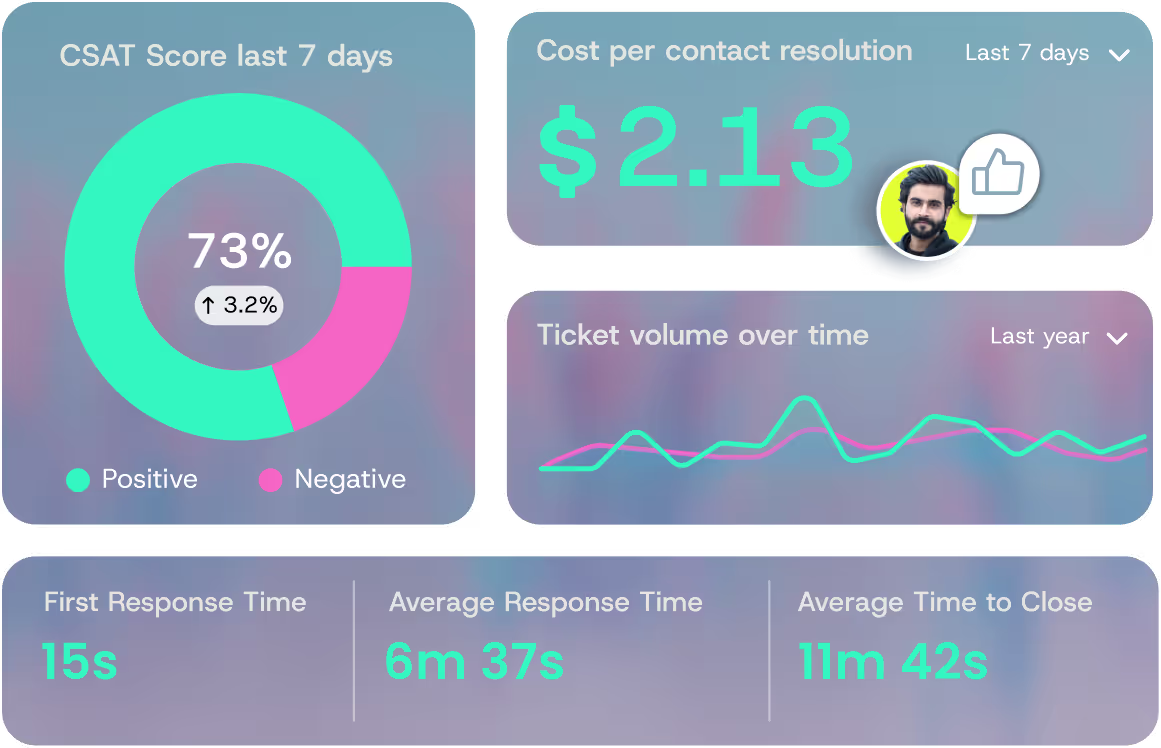
As your product scales and your user base grows, support ticket volume increases. But support teams can't just throw more headcount at the problem indefinitely.
Scaling support well also means being precise about goals: teams that conflate self-service with case deflection often discover they have optimized for ticket avoidance rather than actual issue resolution, which creates hidden churn as the user base grows.
AI support platforms like QueryPal let teams absorb rising ticket volume without adding headcount at the same rate.
The AI resolves routine questions on its own by scanning existing documentation and past tickets, so agents spend their hours on the complex issues that actually need them.
Process scalability matters just as much as infrastructure scalability. Your deployment pipeline, your incident response playbook, your code review process, your on-call rotation. All of these need to work at 10x the current volume.
Teams that only think about server capacity miss this. They end up with infrastructure that scales, but internal operations that can't keep up.
True customer service transformation addresses both the technical and operational sides of scaling.
Common Scalability Mistakes
Even experienced teams make these errors. Recognizing them early saves months of rework.
Premature optimization. Building for millions of users when you have hundreds is expensive and distracting. Over-engineered architecture adds operational complexity without delivering value.
Scale for the demand you can reasonably forecast in the next 12 to 18 months, not for a hypothetical future you might never reach. You can always re-architect later with better information.
Ignoring monitoring and observability. You can't scale what you can't measure. Without metrics on response times, error rates, CPU usage, memory consumption, and queue depths, you're guessing. By the time a user reports that the app is slow, the problem has been building for weeks.
Invest in monitoring tools like Datadog, Grafana, Prometheus, or even open-source alternatives, and set alerts that trigger before performance degrades to the point users notice.
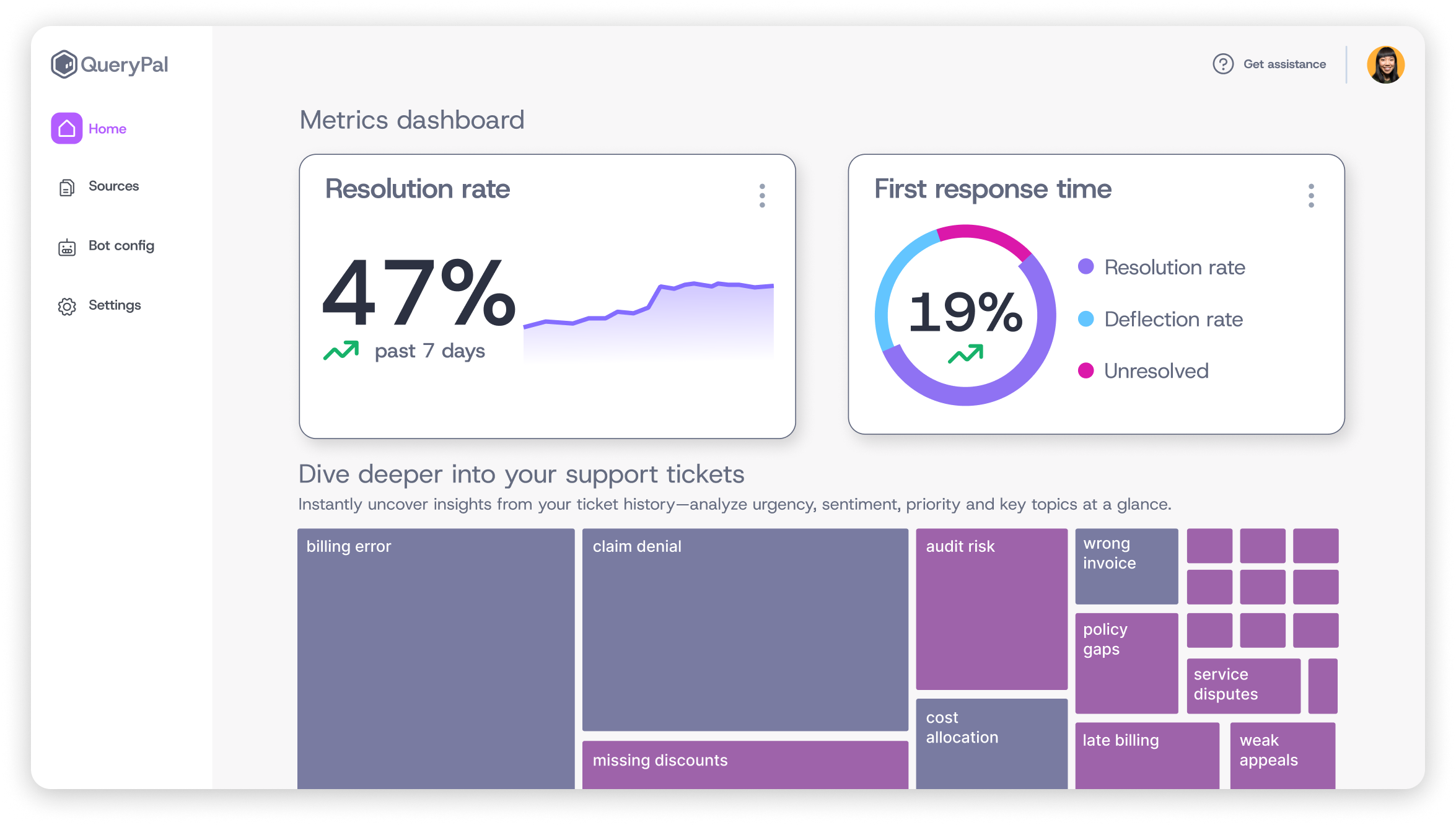
Apply the same measurement rigor to customer service metrics, where response times and resolution rates signal whether your support operations can handle growth.
Scaling everything equally. Not every component of your system faces the same load. Your API might handle 10,000 requests per second, but your admin dashboard serves just 50 users. Scaling both equally wastes money.
Profile your system, identify the actual bottlenecks, and allocate resources where they make a measurable difference.
Treating scalability as a one-time project. Scalability is an ongoing discipline, not a box you check. Traffic patterns change. Data volumes grow. New features introduce new bottlenecks.
The architecture decisions that worked at 10,000 users might crumble at 500,000. Build regular scalability reviews into your engineering cadence, just like you would for security audits or performance testing.
Build Your Scaling Strategy Before You Need It
Scaling too early wastes resources. Scaling too late costs you customers. The trick is knowing the signals.
Watch your response times.
If your p95 latency is creeping upward week over week, you're approaching a capacity ceiling. Don't wait for it to become a user-visible problem.
Monitor error rates under load. A spike in 500 errors or timeouts during peak hours is your system telling you it doesn't have enough headroom.
Pay attention to your team's behavior. If engineers are spending more time on workarounds, manual interventions, and firefighting than on building features, your systems have outgrown their current architecture. That's a signal most dashboards won't show you, but it's one of the most reliable.
Tracking call center productivity alongside infrastructure metrics reveals whether scaling bottlenecks are technical, operational, or both.
Track database performance closely. Slow queries, connection pool exhaustion, and replication lag are early warnings that your data layer is under stress.
The goal isn't to scale preemptively for traffic you may never get. It's to recognize the leading indicators early enough to respond before they become outages. Build your monitoring to catch these software scalability signals, and review them weekly.
Your infrastructure scales on demand. Your support operation should too. As ticket volume grows with your user base, repetitive questions pile up. Every hour agents spend on those is an hour lost on the complex issues that need a human.
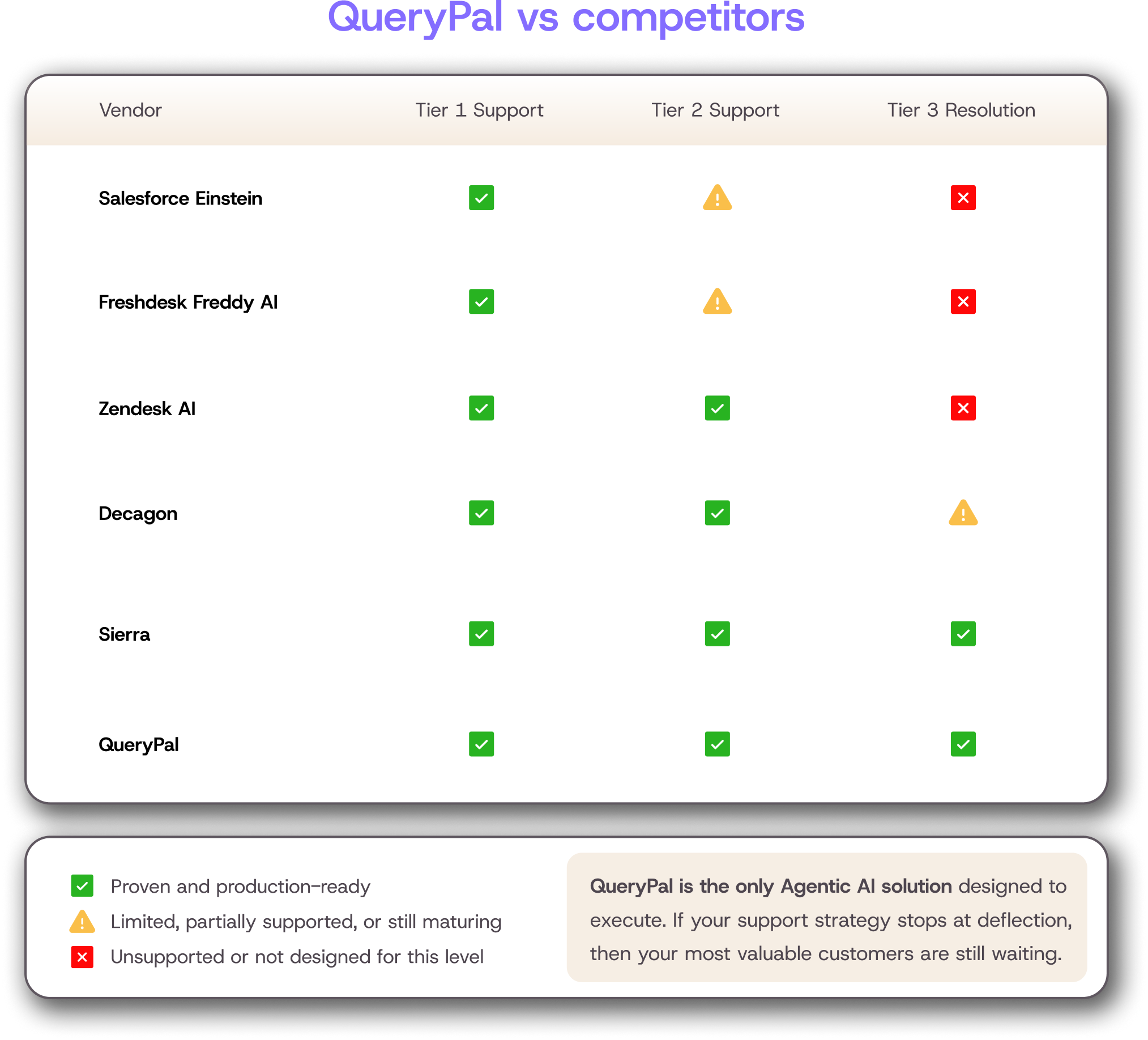
QueryPal is an AI support platform that resolves Tier 1-3 questions on its own. It scans your existing documentation, past tickets, and workflows to give customers accurate, context-aware answers.
It's SOC 2 and GDPR compliant with a self-hosted option for teams that need full control over their data. See how it works with your support stack.
Sources
Hasselbring, Wilhelm, and Guido Steinacker. "Microservice Architectures for Scalability, Agility and Reliability in E-Commerce." 2017 IEEE International Conference on Software Architecture Workshops, IEEE, 2017.
"8 Steps for Migrating Existing Applications to Microservices." Software Engineering Institute, Carnegie Mellon University, 2020.

Activate your free
6 week trial
& white-glove integration support.
Cut support costs by 60%, slash response & resolution times, improve your customer experiences, & reduce agent burnout. Find some time with us to show you how.