What is Service Desk Automation?
IT teams face a massive challenge as request volumes rise and people expect instant answers to their technical problems daily.
Modern technical environments are complex. We have more applications, devices, and remote staff than ever before.
This growth creates a heavy load for help desks. When we rely solely on manual effort, response times slow down.
Technicians get stuck resetting passwords instead of fixing critical errors. This is where smart technology becomes essential for survival.
This technology frees tech squads from boring, repetitive duties. It allows us to focus on complex projects that require human judgment.
By using intelligent tools, we improve the quality of service for everyone in the company.
This article covers the definition of service desk automation, its core components, real-world use cases, benefits, challenges, and implementation steps.
What Is Service Desk Automation?
Service teams often drown in a sea of simple inquiries. Employees need password resets, access rights, or assistance with a slow computer.
When we rely on human effort for every single item, the backlog grows. Technicians get tired, and colleagues get frustrated.
Service desk automation is the use of software to handle service tasks without constant human input. It uses tools like artificial intelligence and logic engines to perform actions that people usually do.
It is not just about moving emails around. It is about actually solving the problem.
For example, if a staff member needs to install a specific program, the intelligence layer can check if they have permission and install it for them. No person needs to click a button.
We should clarify what this means for our jobs. This approach does not replace IT professionals.
It acts like a digital teammate. It handles the boring stuff so we can work on the hard stuff.
It removes the "robot work" from the human schedule. This changes how we manage inquiries.
We move from reacting to problems to fixing them instantly.
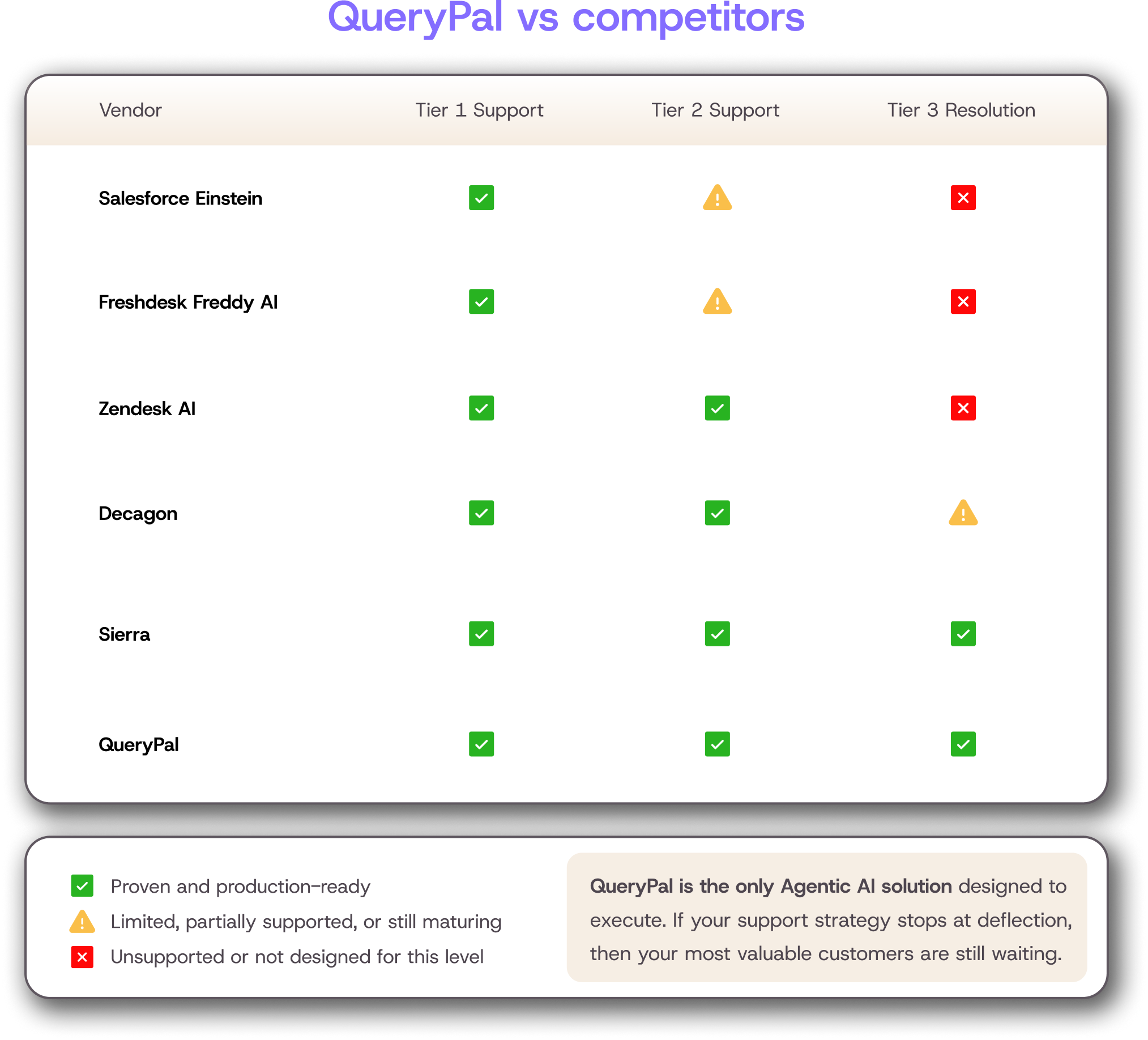
At QueryPal, we believe in resolution, not just deflection through intelligent ticket routing.
We use this technology to give answers, not just to send people away to read a long article they do not understand.
This helps us build an experience that feels helpful and fast.
Core Technologies Behind Service Desk Automation
To make this work, we rely on a few specific pieces of tech. These tools act as the brain and hands of the digital setup.
- Machine Learning: This helps the platform learn from the past. If a specific error message usually means a server is down, the software learns to spot that pattern.
- Natural Language Processing: This lets the computer read messages like a person. It understands that "my screen is black" and "display not working" mean the same thing. [1]
- Workflow Engines: These are the builders. They connect different steps, like asking for approval and then granting access, into one smooth line of action.
How Service Desk Automation Works
The process begins the second someone has a problem. In the old days, a case would sit in a queue until a person opened it.
Now, the technology gets to work immediately.
First, the engine reads the submission. It does not matter if the message comes from Slack, Microsoft Teams, or an email.
The intelligence layer scans the text. It figures out who the sender is and what they need.
It assigns a priority level. If the CEO cannot access email, the tool marks it as urgent.
Next, the software decides where the issue goes. This is called routing.
If the matter is simple, the platform fixes it. If it is complex, it sends the case to the exact technician who knows how to fix it.
This stops items from bouncing around between departments.
Finally, the backend talks to other utilities. It connects with our identity providers and data libraries.
It checks if the employee is allowed to access a file or looks up the right answer to a question. This happens in milliseconds.
Automated Decision-Making & Routing Logic
We set up rules to tell the engine what to do. We might say, "If a request comes from the sales division, send it to the sales admins."
But we also use smart logic. The software looks at the history of similar cases.
It predicts the best path for resolution. This reduces the number of people who have to touch a query before it is closed.
Key Components of an Automated Service Desk
A strong operations setup is like a house. It needs a solid foundation and several key rooms to function properly.
We combine different utilities to create a complete experience.
- Chatbots: These are the friendly faces that talk to staff first. They ask questions to understand the difficulty.
- Logic Engines: These run in the background. They do the heavy lifting, like creating accounts or updating records.
- Knowledge Base: This is the library. The tool uses it to find answers to send to requesters.
- Integration Layer: This connects everything. It lets the central hub talk to billing, HR, and security tools.
We need all these parts to work together. A chatbot is useless if it cannot access the library.
A logic engine cannot work if it is not connected to the employee directory.
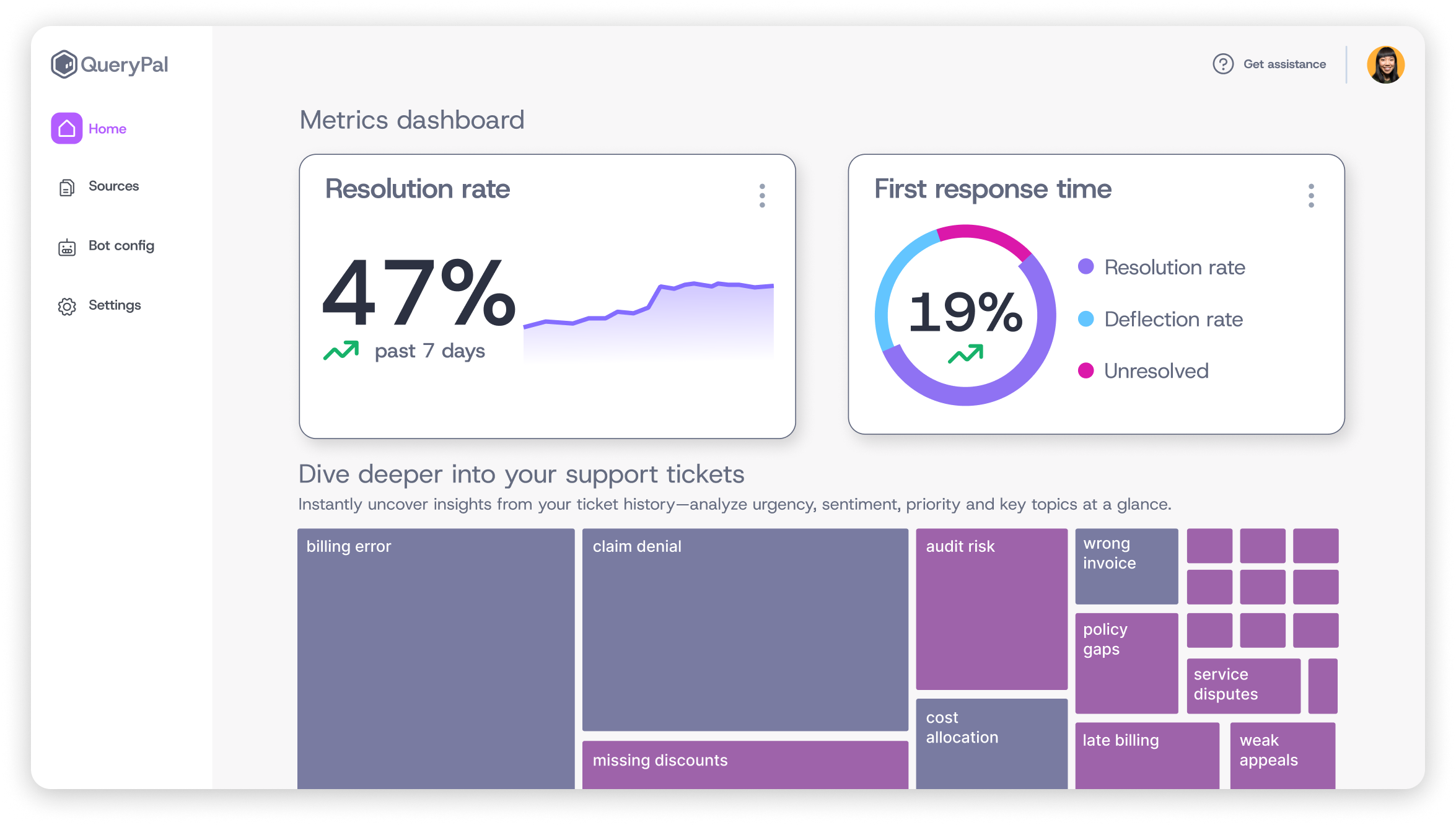
At QueryPal, our suite includes advanced analytics capabilities alongside Intercept and Concierge to connect these dots.
We centralize data so the platform can solve complex situations without asking a human for help every time.
Agentic AI
We use agentic AI chatbots to handle the first contact. When a person asks a question, the bot tries to answer it.
It does not just say "hello." It asks for details. It might ask for a screenshot or an error code.
This availability is a game-changer. Virtual agents do not sleep.
They work on weekends and holidays. This means our team members get assistance 24/7.
It keeps satisfaction high because people do not have to wait until Monday morning for a simple answer.
Workflow Automation Engines
Processing engines are where the magic happens. These are set paths for tasks.
Think about onboarding a new hire. A human usually has to create an email, add them to Slack, and give them access to Notion.
A digital builder does this instantly. We build the path once, and the software follows it every time.
We prefer low-code builders for this. They allow us to change the process easily without needing to write complicated computer code.
Top Use Cases of Service Desk Automation
There are certain tasks where this technology shines the brightest. These are usually high-volume duties that take up a lot of time but do not require much creative thinking. The same pattern drives helpdesk automation on the customer support side.
- Triage: Sorting and assigning incoming messages to the right place instantly.
- Employee Lifecycle: Managing the process when people join or leave the company.
- Self-Service: Helping staff find their own answers without waiting for a technician.
When we apply technology to these areas, we see immediate results. The noise level in the department goes down.
We can finally hear ourselves think. We improve our delivery because we are not bogged down by thousands of tiny chores.
Ticket Creation, Triage & Resolution Automation
Logging issues is boring. Smart software fixes this.
If you’re evaluating vendors for these workflows, our Aisera alternatives guide compares leading approaches to service automation.
The platform listens to emails or chat messages. It creates a record and fills in all the details.
It grabs the requester's name, their computer model, and their location.
Then, it sorts the item. We call this triage.
The engine uses rules to decide if this is a network trouble or a software glitch.
For very common things, like a VPN error, the tool runs a script to fix it. We call this auto-resolution, a form of ticket deflection where the issue never reaches a human queue.
It is the best-case scenario. The problem is gone before a human agent even sees it.
This approach is particularly valuable for SaaS customer support teams handling high volumes of technical queries.
User Lifecycle Requests (Onboarding, Access & Provisioning)
New hires need a lot of things on their first day. Manually setting up accounts leads to mistakes.
We might forget to give them access to a shared folder. Digital processing handles this perfectly.
When HR adds a new person to the directory, the sequence triggers. It creates their email, sets up their hardware request, and grants them the right permissions.
It also handles offboarding. When someone leaves, the tool instantly revokes their access.
This keeps our data secure and ensures we do not pay for licenses we are not using.
Knowledge Management & Self-Service Automation
We want people to help themselves. But staff hate searching through messy folders for a PDF guide.
Intelligent retrieval helps here too.
The platform looks at what the person is typing. If they type "how to export data," the engine pops up the exact article they need.
It puts the answer right in front of them.
Our Concierge module at QueryPal takes this further. It uses Agentic AI to understand the intent and perform the action, keeping sensitive data safe within our infrastructure.
Benefits of Service Desk Automation For IT Teams & End Users
The biggest win is for the IT staff. We get our time back.
We stop feeling like data entry clerks and start acting like problem solvers. Morale goes up when we are not resetting passwords all day.
This approach also removes mistakes. Humans get tired.
We type the wrong letter or forget a step. Software does not get tired.
It follows the instructions exactly every single time. This consistency builds trust with the rest of the company.
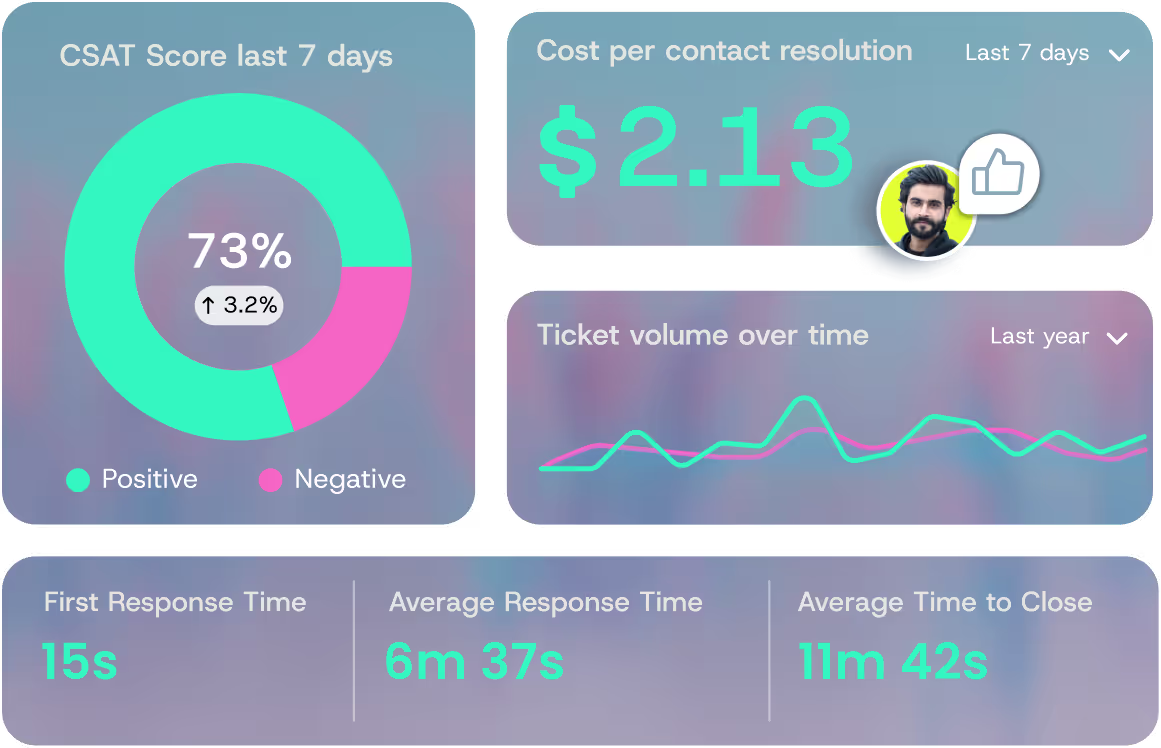
The financial impact is real. We save money by reducing the hours spent on manual assistance.
QueryPal claims to cut costs by up to 60%. That is a massive saving for any business.
It also reduces resolution times by half, which means everyone gets back to work sooner.
These benefits extend across industries, from insurance companies automating claims support to financial services streamlining compliance queries.
Operational Efficiency & SLA Improvements
Speed matters. With smart tools, we handle cases much faster.
We do not have a backlog of simple inquiries clogging up the queue. This improves our Service Level Agreements (SLAs). [2]
We also get better data. The engine tracks everything.
We can see exactly how long a request takes. We can identify trends.
If we see a spike in printer troubles, we know we need to fix the print server. This visibility helps us run a tighter ship.
Challenges of Service Desk Automation And How to Overcome Them
It is not all sunshine and rainbows. We face real challenges when we try to modernize.
We have to deal with complex tech, messy data, and people who are scared of change.
- Complexity: Connecting old computers and legacy programs to new tools can be a headache.
- Bad Data: If our records are wrong, the output will be full of mistakes.
- Fear: Some team members worry that robots will take their jobs.
We overcome these by being smart. We do not rush.
We fix our data first. We talk to our colleagues and explain that this technology is there to help them, not fire them.
Understanding how AI transforms customer service helps teams embrace rather than fear these changes.
Avoiding Over-Automation & Maintaining Human Touch
We can go too far. If we digitize everything, colleagues feel ignored.
Nobody likes getting stuck in a loop with a dumb bot. We must keep the human touch.
We design our paths so that a person is always reachable. If the bot cannot solve it, the case goes to an agent immediately.
We use these tools to remove friction, not to build a wall between us and the requester. We focus on being friendly and helpful, even when using software.
Governance, Data Quality & Security Considerations
Security is non-negotiable. We are giving software the power to make changes.
We need strict rules. We call this governance.
We need to know who changed what and when. We keep logs of every action.
We also ensure our tools are secure. QueryPal offers SOC 2 and GDPR compliance because we know how important it is to keep data safe.
We offer self-hosted deployment options so companies can keep their data inside their own walls.
How to Implement Service Desk Automation
We cannot just flip a switch. Implementing this strategy is a journey.
We need a plan. We start by gathering the right people.
We talk to the service group, the managers, and the staff.
We map out our routines. We write down every step of a manual task.
We fix any broken steps before we digitize them. Accelerating a broken process just makes it break faster.
Then we select our utilities. We look for things that integrate well with what we already have, like Slack or Confluence.
The implementation mirrors broader IT support automation initiatives and customer support automation strategies.
Start Small, Measure Gains & Scale Strategically
We advise starting with one or two small wins. Password resets are a classic first step.
Or maybe managing the triage of incoming emails.
We measure the results. We look at the time saved.
We check if colleagues are happy. When we see it working, we add more.
We scale up slowly. This helps us catch bugs early and keeps the team confident in the new setup.
The Future of Service Desk Automation
The future is exciting. We are moving toward predictive assistance.
Imagine a setup that fixes a crashed app before the person even knows it crashed. That is where we are heading.
We will see more Agentic AI. This means the software will have more agency to act on its own to solve complex problems.
It will not just follow a script; it will think through the difficulty. This shifts our role.
We will become engineers of these platforms. We will spend our time building better ways to work.
This evolution is part of the broader customer service transformation happening across industries, with AI-powered ticketing systems leading the charge.
We encourage you to start now. Look for the repetitive tasks that drain your team.
Find solutions like QueryPal that fit your needs. Start small, but start today. The future of IT is efficient, and it is a better place for all of us.
References
- https://www.ibm.com/think/topics/natural-language-processing
- https://en.wikipedia.org/wiki/Service-level\_agreement

Activate your free
6 week trial
& white-glove integration support.
Cut support costs by 60%, slash response & resolution times, improve your customer experiences, & reduce agent burnout. Find some time with us to show you how.