Top 11 Customer Service Ticketing Software for 2026: Comparison Guide
Ticketing software acts as a central digital hub. It collects customer questions from emails, chats, and calls. It organizes them so staff can fix issues fast.
This technology prevents inquiries from getting lost and enables agents to work more efficiently. This also allows agents to avoid burnout and, therefore, be more productive in the long run.
Read on to find the best tools for 2026.
What is Customer Service Ticketing Software?
These applications centralize product experience inquiries. They convert messages from email, phone, and social media into digital "cases," documenting the issue's lifecycle from start to finish.
This ensures every request reaches the right person.
Unlike messy shared inboxes, modern ticketing systems use an intelligence layer. This technology categorizes tasks and automatically ranks their urgency, transforming chaotic streams into organized workflows.
It allows the workforce to focus on helping people rather than organizing a messy inbox, and avoids anything from falling into the cracks and being forgotten about.
Why Your Business Needs Ticketing Solutions in 2026
Growing businesses cannot rely on basic inboxes without risking mistakes and frustrated customers.
- Scaling Operations: Automate administrative tasks like tagging to manage higher volumes easily.
- Speed: Route questions to the right expert instantly for faster answers.
- Efficiency: Lower costs by providing agents with the context needed to solve issues quickly.
Ticketing Systems: What Should I be Looking For?
Look for specific attributes that improve the product experience.
- Unified Channels: Handle emails, chats, and social messages in one place to avoid tab-switching.
- Integrations: Connect with business apps for a friction-free deployment.
- Innovation: Seek self-driving technology that predicts needs before customers ask.
AI and Self-Driving Intuitive Action Functions
The industry is moving toward customer support automation using continuous learning to improve efficiency. The engine now analyzes messages to route them to the correct department.
We also see the rise of the Agentic UI, which handles routine inquiries autonomously. This creates a self-healing system where common issues are resolved instantly, learning from past fixes to offer better suggestions over time.
Omnichannel Experience Integration
Customers expect smooth conversations regardless of the app used. True omnichannel capability ensures conversation continuity across platforms, like starting via email and finishing over chat.
A unified profile shows the entire history, allowing for immediate recognition of the user. By keeping a full record, the interface ensures customer intent is understood without customers repeating details.
Reporting and Analytics
Accurate data is vital for performance improvement.
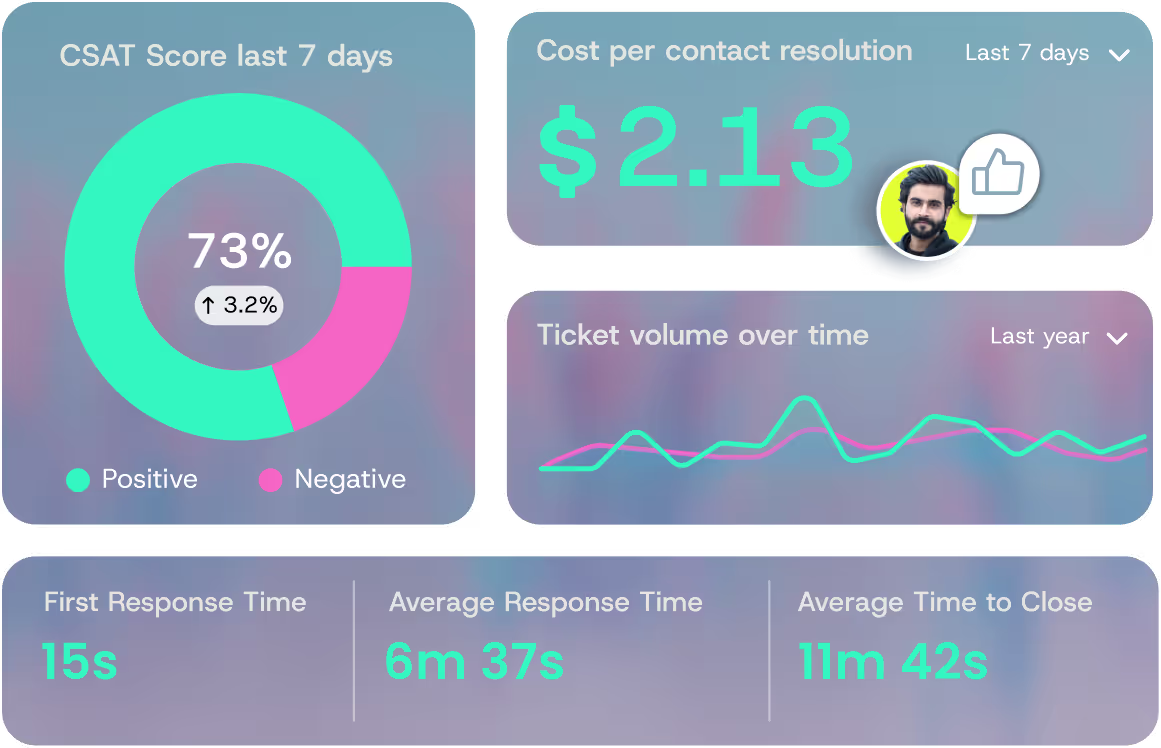
- Metrics: Track essential numbers like first response time.
- Live Monitoring: Use real-time dashboards to spot bottlenecks and reallocate resources.
- Forecasting: Estimate future case volume to ensure preparation.
Here Are the Top 11 Customer Service Ticketing Solutions
We have gathered the top options available right now to help you decide which one fits your specific business needs the best.
1. QueryPal - Best for Knowledge-Driven AI Resolution
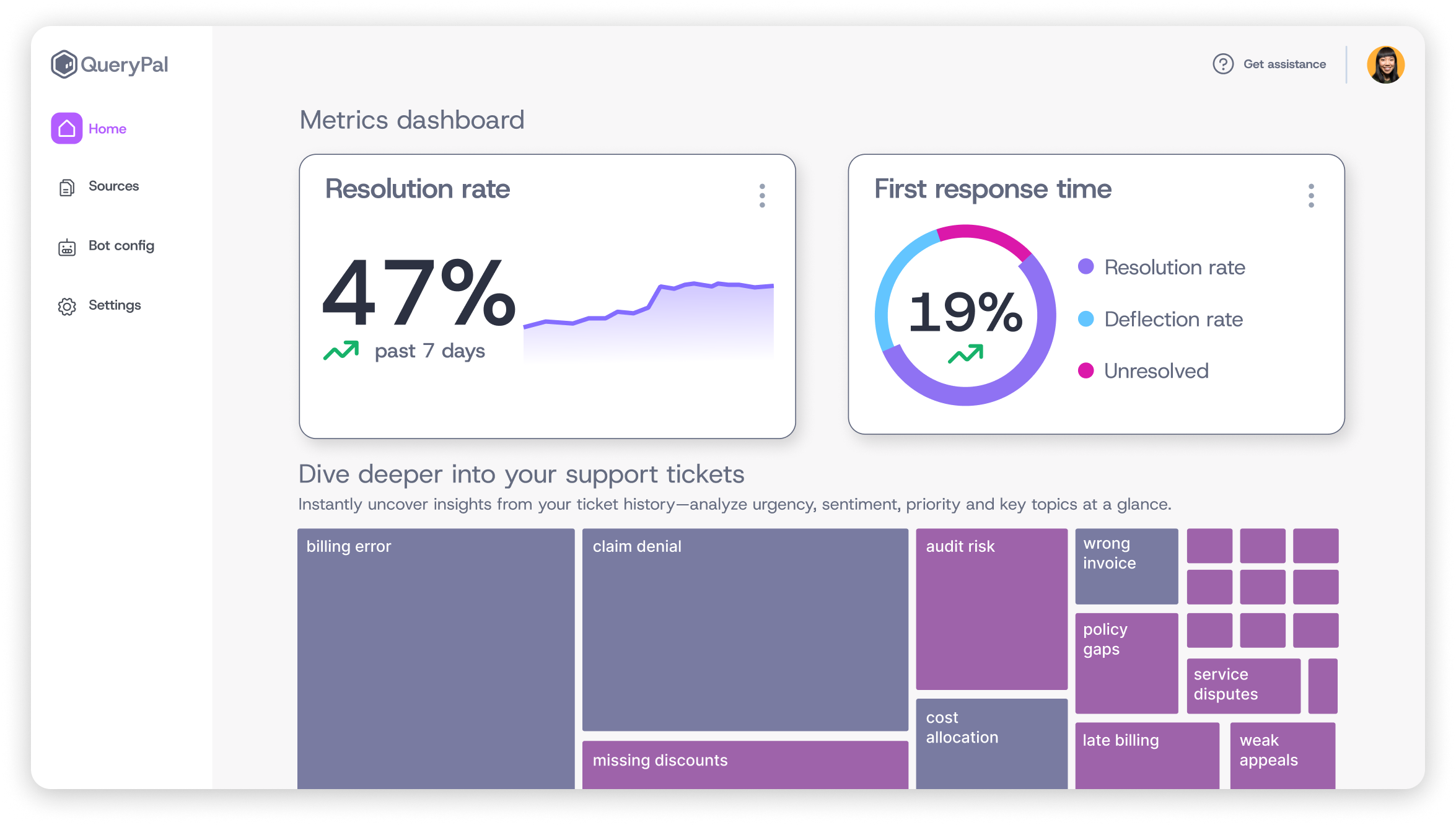
At QueryPal, we focus on resolution. Our solution uses advanced AI technology in customer service to help users understand service data and solve issues efficiently.
We provide visual analytics with treemap functionality. This gives you a clear picture of patterns, helping you spot exactly what problems your users face.
We know that knowledge is scattered, so we connect with over 10 sources. We integrate with Google Drive, SharePoint, Confluence, Notion, GitHub, and StackOverflow.
This builds a comprehensive brain for your operations.
Our email drafting playground is another key component. It allows agents to refine responses with help from our engine before sending, ensuring tone is always perfect.
In short, our mission is to empower customer experience teams with intelligent, autonomous AI that RESOLVES complex issues instead of just deflecting them.
And transform support from a cost center into a strategic, value-driven operation while reducing agent burnout.
2. Zendesk - Best for Enterprise Scale and AI Innovation
Zendesk is a market leader known for its ability to handle massive volumes of inquiries for global enterprises.
- Mature Tech: Their engine is trained on billions of interactions, allowing for accurate automated responses.
- Agent Workspace: They provide a unified view of all channels, offering smart suggestions to speed up workflows.
- Huge Marketplace: With over 1,800 apps, you can connect the software to almost any business application.
3. Intercom - Best for Real-Time Conversational Engagement
Intercom focuses on messaging-first experiences. They prioritize live chat and real-time engagement over traditional email workflows.
They use a digital agent named Fin to handle routine queries using your existing help content. Fin resolves issues without human involvement, freeing up staff for complex tasks.
Intercom also excels at providing an anticipatory experience. This allows you to reach out to users who appear stuck on your website, shifting the dynamic from reactive to proactive.
4. Freshdesk - Best Budget-Friendly Option for Small Teams
Freshdesk offers a robust set of tools at a price point that is accessible for growing businesses. It's among the best help desk software for small business operations.
- Cost-Effective: Pricing starts around $15 per agent, providing a full suite of capabilities without high costs.
- Mobile Access: Their dedicated mobile application allows staff to manage cases and respond from anywhere.
- Workflow Safety: Collision detection prevents two people from working on the same file, avoiding confusion.
5. Salesforce Service Cloud - Best for CRM-Integrated Service
For organizations already using Salesforce, Service Cloud offers unmatched connectivity between sales data and service operations.
This dashboard provides a complete view of the customer. Agents can see sales history and past interactions in one place. It uses an intelligence layer called Einstein to recommend the best next steps.
Service Cloud is designed for scale. It supports complex multi-channel operations and offers deep customization for enterprises with specific workflow requirements.
6. ServiceNow - Best for IT Operations Management
ServiceNow specializes in IT departments. It functions as a comprehensive IT ticketing system, focusing on technical workflows, incident management, and internal employee requests.
- IT Focus: The platform excels at tracking changes to IT infrastructure, ensuring stability and control.
- Asset Connection: It integrates with monitoring programs to create cases automatically when hardware issues are detected.
- Complex Logic: The system automates intricate workflows required for compliance, ideal for large corporate IT groups.
7. Monday Service - Best for No-Code Customization
Monday Service leverages a visual interface. It allows groups to build custom workflows without technical coding skills.
The product features a drag-and-drop builder for creating processes easily. It uses intuitive action to tag and route inquiries based on urgency or sentiment.
This flexibility makes it an excellent choice for personnel who need to adapt their workflows frequently. It scales well for growing organizations that require a tool that changes as fast as they do.
8. Help Scout - Best for Email-Centric Teams
Help Scout provides a shared inbox experience that feels personal. It avoids the robotic feel of traditional portals.
- Human Feel: The interface mimics a standard email inbox but adds powerful collaboration tools behind the scenes.
- Simplicity: They prioritize ease of use, allowing new users to become productive immediately without training.
- Contact Pricing: Their pricing model is based on customers rather than agents, which is cost-effective.
9. Gorgias - Best for E-commerce Businesses
Gorgias is designed for online retailers. It offers deep integrations with platforms like Shopify and WooCommerce.
The ticketing application pulls order data directly into the view. Staff can see shipping status and details instantly. They can refund orders or update addresses without leaving the helpdesk.
This page-aware intelligence speeds up resolution times significantly.
It also tracks revenue generated by the care workforce, helping businesses understand the financial impact of service.
10. Front - Best for Team Collaboration
Front treats every incoming message as a collaborative task. It enables groups to work together on complex inquiries.
- Team Drafts: Agents can draft responses together and comment internally on specific emails before sending.
- Unified Inbox: It consolidates individual and shared addresses into one view, reducing account switching.
- Smart Routing: Automated rules assign messages to the correct person based on keywords and expertise.
11. LiveAgent - Best for Comprehensive Live Chat Features
LiveAgent offers a feature-rich solution. It has a strong focus on live chat capabilities and a universal inbox.
Their real-time typing view allows agents to see what a customer is writing before they send it. This gives staff extra time to prepare accurate answers.
The universal inbox consolidates chats, emails, and calls into a single stream. LiveAgent is known for including a vast array of functions in its base plans, offering high value.
How Do You Choose the Right Ticketing Tool For You?
Selecting the correct software involves a structured evaluation of your business size, industry requirements, and operational challenges.
- Evaluation Framework: Assess your budget, technical skills, and volume to filter out mismatched options.
- Comparison Matrix: Create a chart comparing critical aspects like setup time for top candidates.
- Trial Period: Utilize free trials to let your actual agents test the workflow to ensure it feels natural.
Assessing What Your Business Needs Are
To make an informed decision, you must first clearly define the current problems your workforce faces daily.
Identify your pain points. Are you losing emails? Is the response time too slow? Calculate your expected inquiry volume to ensure the helpdesk system can handle the load.
Differentiate between capabilities you absolutely need and those that are just nice to have. If you need web-based help for a website, prioritize that over phone functions.
You can always re-evaluate and add on at a later date.
Some Implementation and Onboarding Considerations
Switching to a new provider requires careful planning. You need to ensure a smooth transition and minimal disruption to customers.
- Timeframe: Be realistic about the schedule; full implementation can take weeks depending on data complexity.
- Data Transfer: Ensure the new program can import historical data so you do not lose customer context.
- Team Training: Allocate time for training so your staff is comfortable with the new capabilities.
What's the Total Cost of Ownership?
The advertised price is rarely the final cost. You must analyze all potential expenses associated with the solution.
Review the pricing model carefully. Some vendors charge per agent, while others charge per ticket. Check for hidden costs like implementation fees, training sessions, or premium options.
Calculate the return on investment by estimating the time saved. If the platform saves 10 hours a week, the efficiency gain justifies the fee.
Integration Capabilities: Let's Make a Comparison
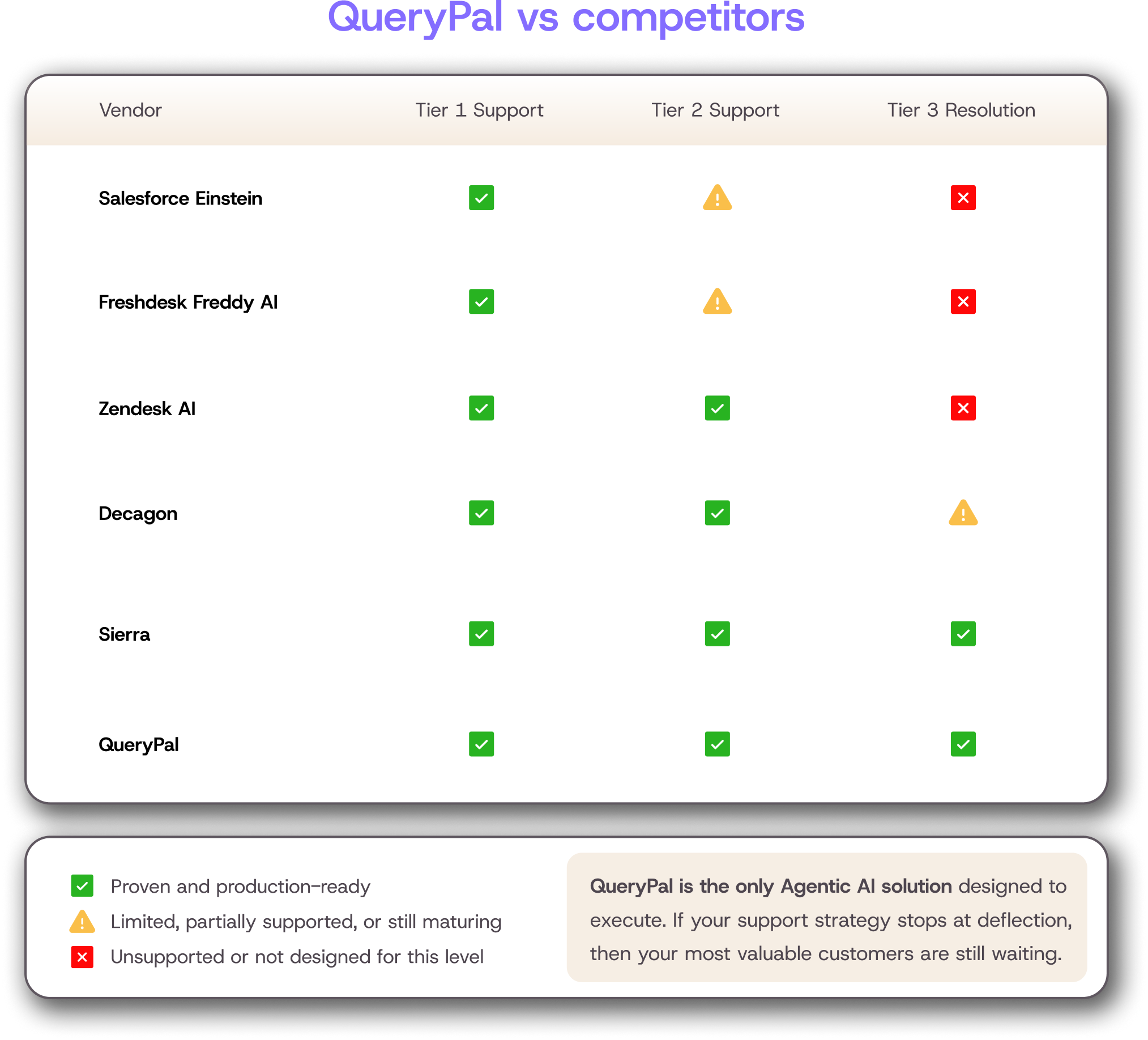
A ticketing hub must function as part of a larger ecosystem. It must connect seamlessly with other critical business applications.
- CRM Sync: Integration with platforms like Salesforce ensures sales and service workforces view the same data.
- Knowledge Connectivity: QueryPal connects with over 10 sources, like Notion and GitHub, to create a central brain.
- Team Communication: Connecting with Slack or Microsoft Teams allows agents to consult internal experts easily.
Some Security and Compliance Features to Look At
Protecting customer data is a non-negotiable requirement. You need a provider that adheres to strict global security standards.
Most enterprise-grade solutions, including ours, maintain SOC 2 Type 1 and Type 2 compliance. This certifies that we follow rigorous security procedures. You must also check for GDPR compliance if you serve European customers.
This ensures you can manage data privacy requests legally. Healthcare companies require HIPAA compliance. Always verify these certifications before purchase.
Common Pitfalls to Avoid: Keep a Lookout
Many organizations fall into the same traps when selecting a system. This leads to wasted budget and operational inefficiencies.
- Price Focus: Choosing the cheapest option often leads to missing tools that save significant labor costs.
- Feature Bloat: Avoid buying complex systems with unnecessary functions that create clutter and confusion.
- Vendor Lock-in: Ensure you can export your data easily if you need to switch platforms later.
Some Arising Trends in Ticketing Technology
The industry is rapidly evolving with new innovations. These will fundamentally change how businesses handle product experience.
We are entering an era of intent where technology predicts user needs before they ask. We expect to see fully autonomous AI agents capable of resolving complex technical issues without human aid.
Proactive interception will become standard practice. Proactive being the keyword, as reactive generally does not keep a good customer base.
Voice technology is improving, enabling natural conversations with automated systems. Furthermore, we will see a convergence where ticketing platforms merge with broader experience tools to create a unified journey.
Time to Make Your Decision
Choosing the right ticketing solution is a strategic move. It impacts your team's efficiency and your customers' happiness.
Prioritize clarity and resolution in your search. Review your specific needs, verify security standards, and seek a partner that offers true automation.
We encourage you to explore QueryPal and other top providers to see how a seamless overlay of technology can transform your operations. Plan your implementation with care, and you will build a foundation for success in 2026.
References
[1] "CRM & Ticketing." University of Michigan Information and Technology Services, its.umich.edu/enterprise/crm-ticketing. Accessed 6 Dec. 2025.
[2] "Help Desk Ticketing Tool." TimeChart, www.timechart.org/help-desk-ticketing-tool.html. Accessed 6 Dec. 2025.

Activate your free
6 week trial
& white-glove integration support.
Cut support costs by 60%, slash response & resolution times, improve your customer experiences, & reduce agent burnout. Find some time with us to show you how.