- Complex support requires investigation. AI chatbots may retrieve relevant answers without being able to diagnose the customer’s actual problem.
- Customer context changes troubleshooting. Similar symptoms can have different causes depending on configurations, history, and technical environments.
- Knowledge bases don’t capture every workflow. Experienced support engineers often rely on investigative steps that aren’t fully documented.
- Trust drives AI adoption. Support teams need visibility into AI recommendations, diagnostic findings, and the decisions behind them.
AI chatbots struggle with complex customer support because resolving technical issues often requires more than retrieving information. Effective troubleshooting depends on customer-specific context, access to technical systems, and the ability to investigate problems through multiple steps. Without those capabilities, even a chatbot that provides accurate answers may struggle to resolve the underlying issue. That’s one of the biggest AI chatbot adoption challenges facing enterprise support organizations today.
AI has gotten considerably better at answering questions, summarizing documentation, and helping customers with common issues. But after spending more than a decade working in enterprise technical support, I’ve found that some of the hardest cases aren’t difficult because the answer is complicated. They’re difficult because figuring out what’s actually wrong takes time.
That’s a very different problem to automate.
Why do AI chatbots struggle with complex support issues?
AI chatbots struggle with complex support issues because troubleshooting often requires a sequence of investigative decisions rather than a single answer. The system needs to identify possible causes, gather evidence, interpret the findings, and determine what to investigate next.
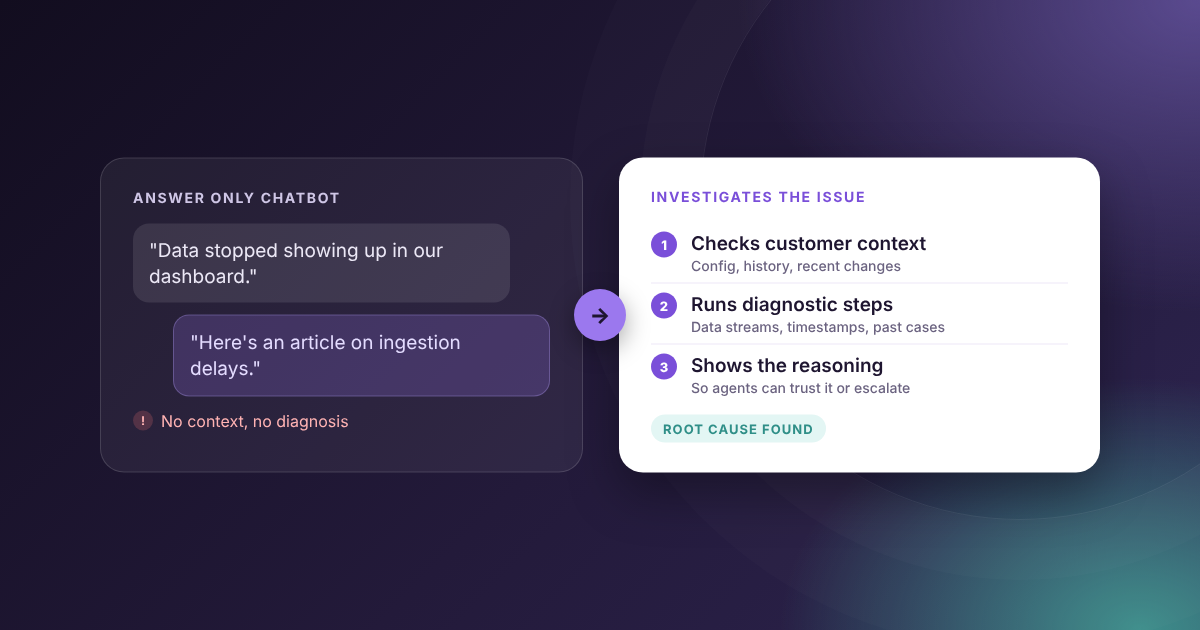
Consider a customer reporting that data has stopped appearing in their monitoring dashboard. A chatbot might find documentation about ingestion delays or recommend checking the dashboard configuration. Those are reasonable suggestions, but they don’t necessarily explain what’s happening.
During my time working with enterprise monitoring software, we regularly dealt with customers reporting missing data. Before we could work toward a resolution, we needed to determine what “missing” actually meant.
Was the data not being ingested? Was it arriving with incorrect timestamps? Was there an issue with how the data was formatted or queried?
Sometimes that meant examining incoming data streams, checking naming conventions and custom tags, or comparing what we were seeing against the customer’s configuration. We didn’t always know what to investigate next until we’d completed the previous step.
Over time, we developed ways to perform some of those investigations ourselves rather than relying on engineering for every diagnostic check. That made a meaningful difference in how we approached these cases.
This is the distinction I think companies sometimes overlook when evaluating AI customer support. A chatbot that can retrieve the right documentation is useful. An AI system that can investigate an issue, interpret the results, and determine the next appropriate step is considerably more valuable. That requires capabilities beyond a conversational interface.
Why aren’t knowledge bases enough for AI customer support?
Knowledge bases are an important foundation for AI technical support and customer support automation, but they rarely capture everything needed to resolve complex technical issues.
Think about how an experienced support engineer handles an unfamiliar problem. They might search previous cases, review documentation, examine logs, or remember something similar they encountered months earlier. Sometimes they’ll reach out to engineering or another support engineer who has dealt with the issue before.
Not all of that knowledge makes it into a troubleshooting article. Even when a case is documented, the record may focus on the eventual resolution rather than the investigation that led to it.
For example, a historical case might indicate that updating a configuration setting resolved an issue. What it may not explain is how the engineer determined that the setting was responsible in the first place.
That’s an important gap. A chatbot could retrieve that case and recommend the same change to another customer experiencing similar symptoms, but unless it understands the conditions that made the original solution appropriate, the recommendation could be wrong.
Research by Lewis and colleagues on retrieval-augmented generation (RAG), published at NeurIPS in 2020, demonstrated how combining language models with external information retrieval can improve factual answer generation. It’s an important foundation for modern AI knowledge systems, but the research focuses on knowledge-intensive language tasks rather than executing technical support investigations.
That’s the distinction worth keeping in mind. Connecting AI to more knowledge sources helps, particularly when those sources include historical cases and internal troubleshooting documentation. Access to information, however, doesn’t automatically translate into the ability to use it correctly.
For complex inquiry handling, AI needs to understand not only what resolved a previous issue, but also how to determine whether that resolution applies to the current situation.
How does missing customer context affect chatbot performance?
Missing customer context can lead AI chatbots to provide generic or irrelevant troubleshooting recommendations, even when those recommendations are technically accurate.
Imagine two enterprise customers reporting that an integration has stopped working. One might have an expired authentication token. Another could have changed permissions or encountered an upstream service failure.
From the initial support request, those issues might look nearly identical. An experienced support engineer would want to understand the customer’s environment, recent changes, previous cases, and troubleshooting already performed before deciding what to investigate.
I’ve seen plenty of situations where the initial description of a problem didn’t tell us nearly enough to understand what was actually happening. That’s why customer history and access to technical systems are so important. An AI system connected to a CRM, ticketing platform, monitoring environment, or other relevant tools has a better opportunity to build that context.
But integrations alone don’t guarantee better results.
The AI still needs to identify which information matters, distinguish relevant findings from unrelated details, and avoid making assumptions when information is incomplete. Otherwise, it risks sending customers down a troubleshooting path that doesn’t address their problem.
Why do support teams resist AI chatbot adoption?
Support teams often resist AI chatbot adoption because they cannot easily verify its recommendations or understand how it reached a conclusion. When agents remain accountable for the outcome, unreliable or unexplained recommendations can create additional work instead of reducing it.
I think this is one of the more misunderstood aspects of AI adoption. There’s a tendency to assume support professionals are reluctant to use AI because they’re uncomfortable with change or worried about automation replacing their jobs. Those concerns certainly exist, but there’s also a much more practical consideration: support engineers don’t want to give customers bad advice.
Imagine you’re working on a customer escalation and an AI assistant recommends changing a configuration setting. Before following that recommendation, you’d probably want to know why.
Did the AI examine the customer’s environment? Did it find a similar issue in a previous case? Is it referencing documentation that applies to the customer’s software version?
If you can’t answer those questions, you’re probably going to investigate the recommendation yourself. If you have to repeat the work the AI supposedly performed, how much time are you actually saving?
This is where visibility becomes important. The NIST AI Risk Management Framework identifies reliability, accountability, transparency, and explainability as important characteristics of trustworthy AI systems. These considerations are particularly relevant in customer support, where an incorrect recommendation can affect a customer’s environment and create additional work for the team responsible for resolving the issue.
Support teams need to understand what information AI considered, what troubleshooting steps it performed, and why it reached a particular conclusion. They also need to know when the system is uncertain.
Personally, I’d rather have an AI system recognize that it doesn’t have enough information and escalate appropriately than confidently recommend something that creates additional problems.
Trust isn’t something organizations can simply ask their support teams to have. The technology needs to demonstrate that it’s reliable.
What role do integrations play in AI support automation?
Integrations allow AI support systems to access the customer information, diagnostic tools, and workflows needed to investigate issues beyond what’s available in documentation. Without them, even a capable AI model may be limited to suggesting steps that a human must perform.
Enterprise support teams rarely work within a single application. An engineer might start with a Salesforce case, review previous interactions, examine logs in another system, and compare findings against internal documentation before determining the next step. If AI can securely access those same resources, it becomes possible to automate portions of that investigation.
Think back to the missing-data example. An AI system that can examine incoming data, inspect timestamps, and compare findings against previous cases could potentially narrow down the issue before an engineer gets involved. That would be useful even if the AI couldn’t fully resolve the problem.
Giving AI access to tools also introduces another question: how much should it be allowed to do independently?
Reading diagnostic information is very different from changing a customer’s production configuration, and I think organizations should approach that distinction carefully. Start by allowing AI to investigate and recommend actions. Evaluate whether its findings are accurate and useful. Then expand its responsibilities as it demonstrates reliable performance, with appropriate safeguards for higher-risk tasks.
Not every support issue needs to be fully automated to deliver value. If AI can perform the initial investigation and give an engineer a useful starting point, that alone can reduce the time required to resolve an issue.
How should companies measure AI chatbot performance?
Companies should measure AI chatbot performance using verified resolution rates, time to resolution, escalation quality, customer satisfaction, and the amount of human rework required. Deflection rates are useful, but they don’t necessarily indicate whether a customer’s issue was resolved.
I’d be particularly careful about treating deflection as the primary measure of success. A customer might leave a chatbot conversation because the recommendations weren’t helpful. Another might spend ten minutes following troubleshooting steps before eventually opening a support ticket anyway.
Depending on how deflection is measured, those interactions could make the chatbot appear more successful than it really is.
For enterprise support leaders, I’d focus on a few practical questions:
- Did the customer actually get their problem resolved?
- Did AI reduce the amount of work required from the support team?
- Were the recommended troubleshooting steps appropriate?
- Did the system recognize when escalation was necessary?
- Did AI introduce additional work or delays?
I’d also recommend evaluating AI against real historical support cases rather than relying entirely on demonstrations. Take a collection of resolved cases, provide the AI with the information it would reasonably have had during the original investigation, and see how it performs.
Does it ask the right questions? Does it identify missing information? Can it work through the investigation without being given the resolution upfront?
It’s important to prevent the final resolution from leaking into the information available during testing. Otherwise, you may be measuring how well AI recognizes an answer rather than how well it investigates a problem.
That kind of evaluation tells you much more about actual chatbot performance than whether the system can produce a convincing response to a carefully selected question.
How can organizations overcome AI chatbot adoption challenges?
Organizations can improve AI chatbot adoption by starting with well-defined support workflows, providing access to relevant customer context, testing diagnostic performance, and giving support teams visibility into AI decisions.
I’d approach implementation in four stages:
- Understand the workflow. Identify how experienced engineers investigate common support issues, including the systems they access and decisions they make.
- Test against real cases. Evaluate AI using historical cases with known outcomes, while withholding information that wouldn’t have been available during the original investigation.
- Keep humans involved where appropriate. Allow agents to review diagnostic findings and recommendations, particularly when proposed actions could affect customer environments. If those recommendations are incorrect or unhelpful, allow agents to easily flag them to improve the system over time.
- Expand autonomy based on results. Increase the tasks AI can perform independently as it demonstrates accuracy, reliability, and appropriate handling of uncertainty.
There’s no reason every workflow needs to reach full automation. For some issues, an AI system that collects relevant information and performs the initial diagnostic steps may deliver most of the value without ever making a change to the customer’s environment.
The important thing is to measure whether the process is actually improving.
How does QueryPal approach complex customer support?
At QueryPal, we’ve focused on a lot of the same challenges discussed throughout this article, particularly the gap between providing an answer and actually helping resolve a customer issue.
Our approach starts with understanding how support teams investigate problems. That includes looking at the information engineers use, the systems they work across, and the steps they take before reaching a resolution.
Rather than treating every inquiry as a question that needs an immediate answer, QueryPal is designed to support more involved troubleshooting workflows. That can include using relevant case history, gathering additional context, and working through investigative steps that would otherwise require a support engineer.
Visibility is another important part of that approach. Support teams need to understand what AI is doing and why. We believe that giving engineers insight into the information and steps behind AI recommendations is essential, particularly as organizations begin trusting AI with more complex work.
The goal isn’t necessarily to automate every customer interaction. It’s to help support organizations reduce the manual investigation required to resolve issues while maintaining appropriate human oversight.
Common questions about AI in customer support
Can AI chatbots replace human technical support engineers?
AI chatbots can automate many routine support tasks and assist with complex troubleshooting, but they cannot reliably replace human engineers in every situation. Issues involving incomplete information, unfamiliar environments, operational risk, or unusual failures may still require human judgment and intervention.
What’s the difference between an AI chatbot and an AI support agent?
An AI chatbot primarily interacts with users through conversation, often retrieving information or generating responses. An AI support agent may also use tools, access external systems, and perform multi-step tasks. The distinction depends on the system’s actual capabilities rather than the terminology used by a vendor.
With AI agent assist, the system supports an agent who reviews its recommendations and decides what to do next.
Are AI chatbots effective for enterprise customer support?
AI chatbots can be effective for enterprise support when their capabilities match the complexity of the issues they’re expected to handle. Common, well-documented inquiries are generally easier to automate, while technical investigations may require customer context, system integrations, and more sophisticated workflows.
What should support leaders look for when evaluating AI customer service solutions?
Support leaders should evaluate diagnostic capabilities, access to customer context, system integrations, transparency of recommendations, security controls, and escalation behavior. Testing against real support cases helps establish whether AI can contribute to issue resolution rather than simply generating plausible answers.
Moving beyond the chatbot
I don’t think the biggest opportunity for AI in customer support is answering more questions. We’ve already made considerable progress there. The more interesting opportunity is helping support teams resolve issues that traditionally require experienced engineers, multiple systems, and a fair amount of investigation.
If an AI system can investigate an issue, gather relevant information, and give an engineer a useful starting point, it’s already contributing to faster resolution. If it can consistently demonstrate that it handles those tasks well, organizations can gradually trust it with more responsibility.
For me, that’s a better way to think about customer support automation: not how many conversations we can automate, but how much of the actual troubleshooting work we can reliably take off the support team’s plate.
It’s also a big part of what we’re working toward at QueryPal: helping support teams resolve more complex customer problems, with the visibility and control needed to trust the process.
See how QueryPal can support your team’s complex troubleshooting workflows. Request a free ticket analysis with no commitment, or email us at sales@querypal.com.
Sources
- Retrieval-Augmented Generation for Knowledge-Intensive NLP Tasks, Lewis et al., NeurIPS 2020
- AI Risk Management Framework, National Institute of Standards and Technology (NIST)
Related reading from QueryPal
- AI in Customer Service: A Complete Guide
- AI Audit Trails for Compliance: What Customer Support Teams Should Track
- AI Support Agent Handoff: When and How to Escalate to Humans
- Least Privilege for AI Agents: Securing Customer Support Automation
- What Is Deflection Rate? Optimizing One of CX’s Most Important Metrics
- How to Evaluate an AI Support Agent Before Deployment
- AI Agent Failure Rate: When Is Support Ready for Autonomous Responses?